
|
Do it yourself
| |||
| ||||


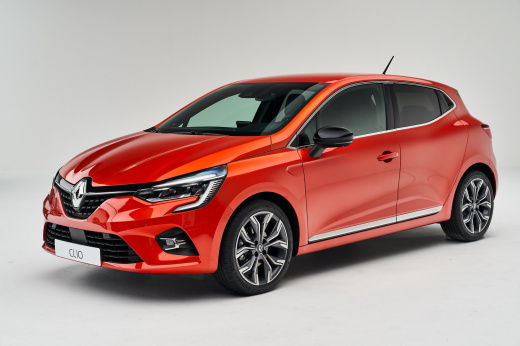
How to Reset the Tyre Pressure Warning Light on the Renault Clio
Model: Renault Clio
- Years:
2019, 2020, 2021, 2022, 2023, 2024, 2025, 2026
Video tutorial
Today, in this guide, we will see the steps and instructions that will allow us to reset the tyre pressure warning light on the Renault Clio; before recalibrating the TPMS sensors, it is necessary that all four tyres are at the correct operating pressure. Then, get into the vehicle and start the ignition; from the central display, navigate to the vehicle settings and then to the tyre pressure section, confirming and proceeding to recalibrate the TPMS sensors and reset the warning light on the instrument panel!
Posted on 28 October 2026 by ScegliAuto
Related tutorials
Renault Clio
(2019-2026 /
Clio 5, Clio V)
The activation of the tyre pressure warning light indicates an anomaly in the pressure of one or more tyres; before resetting the light on the Renaul…

Renault Clio
(2019-2026 /
Clio 5, Clio V)
In the following article, we will see how to reset the tire pressure warning light on the Renault Clio 5. This procedure is useful after adjusting th…

Renault Clio
(2019-2026 /
Clio 5, Clio V)
These brief steps will allow you to reset the tyre pressure warning light (TPMS) on the Renault Clio; before performing the reset, ensure that all fo…
Other guides you may be interested in |
How to reset the brake wear warning light on the Ford Transit?
To reset the brake wear warning light on the Ford Transit, first replace the worn brake pads with new replacement parts. Once the replacement is complete, disconnect the wear sensor connectors to allow them to reset. Then reconnect all the connectors to ensure they can read the new wear values. Therefore, enter the cabin and turn on the instrument panel to verify that the brake pad wear warning light has been reset. by ScegliAuto More videos
|
|
For advertising on this site Write to info@scegliauto.com
ScegliAuto is not responsible for any inaccuracy of the data in the lists. To report any inaccuracy or your business (if you own the business in question), please write to info@scegliauto.com
Number of seconds to generate the page: 0.011
(c) ScegliAuto 2026 - info@scegliauto.com - Privacy policy VAT number: IT01247470535 |
