
|
Do it yourself
| |||
| ||||


How do you reset the Uconnect 7?
Model: Fiat Fiat Various
Video tutorial
The Uconnect technology is used in Fiat vehicles, among others, and aims to connect external devices to the car radio, such as smartphones, as well as provide information like satellite navigation, etc. This allows you to read music tracks, manage phone calls, and so on. But in case you decide to delete all your data and restore everything to its original state, what do you need to do? Watch the video tutorial and you will understand: turn on the dashboard, press the Menu, Media, and Radio touchscreen buttons simultaneously, then press 8pnd and finally Restore Factory Defaults. Reset complete.
Posted on 28 February 2025 by ScegliAuto
Related tutorials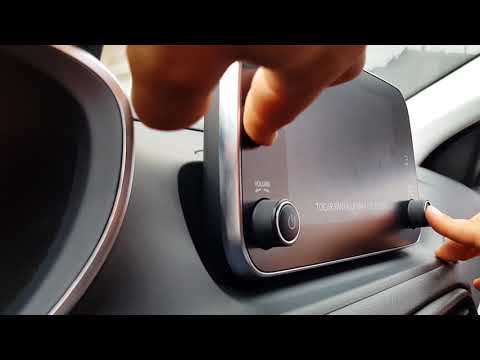
Fiat Fiat Various
If you need to reset the Uconnect system in your Fiat Tipo to default settings, follow the steps in the accompanying video. This guide applies to all…

Fiat Fiat Various
The Uconnect Fiat system, active in the cars of this manufacturer, is used to control various available functions, such as the radio, navigation syst…

Fiat Fiat Various
In this video, you will see an optional service of the Fiat UConnect system, which alerts you immediately in case of suspected theft and connects you…
Other guides you may be interested in |
How to Reset the Tyre Pressure Warning Light on the Opel Mokka?
To reset the tyre pressure warning light on the Opel Mokka, turn on the ignition by inserting the key into the ignition switch. Once the ignition is on, navigate through the menu that appears on the dashboard by pressing the MENU button on the lever to the left of the steering wheel. When the tyre pressure option appears, press and hold the SET/CLR button located on the same lever. This will reset the warning light, and you can then turn off the ignition. by ScegliAuto More videos
|
|
For advertising on this site Write to info@scegliauto.com
ScegliAuto is not responsible for any inaccuracy of the data in the lists. To report any inaccuracy or your business (if you own the business in question), please write to info@scegliauto.com
Number of seconds to generate the page: 0.151
(c) ScegliAuto 2026 - info@scegliauto.com - Privacy policy VAT number: IT01247470535 |
