
|
Do it yourself
| |||
| ||||


Honda Hr V - Onboard computerOnboard Computer Honda Hr V (2021-2028 / rv 5, rv 3, rv 4, rv 6) Honda Hr V (2021-2026 / RV5, RV3, RV4, RV6) How to reset the tire pressure sensor on the Honda HR V In today's article, we will see how to reset the tire pressure warning light of the Honda HR V, in case this light remains on even after bringing the tires to …Read all… Posted on 28 December 2024 by ScegliAuto  Honda Hr V (2016-2022 / RU, MK 2) How to Reset the Onboard Computer in the Honda HR-V? In this tutorial, you will learn how to reset the onboard computer in the Honda HR-V. This operation is extremely simple and quick, and can be performed as a …Read all… Posted on 2 November 2026 by ScegliAuto 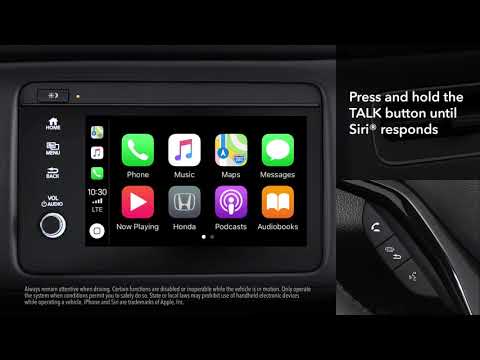 Honda Hr V (2016-2022 / RU, MK 2) How to Connect an iPhone to the Onboard Computer of a Honda HR-V Before you can start, sit in the driver's seat of your Honda HR-V. Begin by connecting your iPhone using the appropriate Apple USB cable to the vehicle's USB …Read all… Posted on 23 June 2026 by ScegliAuto Onboard Computer Honda Hr V (2016-2022 / ru, mk 2)
Honda Hr V (2021-2026 / RV5, RV3, RV4, RV6)How to reset the tire pressure sensor on the Honda HR V In today's article, we will see how to reset the tire pressure warning light of the Honda HR V, in case this light remains on even after bringing the tires to …Read all… Posted on 28 December 2024 by ScegliAuto
Honda Hr V (2016-2022 / RU, MK 2)How to Reset the Onboard Computer in the Honda HR-V? In this tutorial, you will learn how to reset the onboard computer in the Honda HR-V. This operation is extremely simple and quick, and can be performed as a …Read all… Posted on 2 November 2026 by ScegliAuto
Honda Hr V (2016-2022 / RU, MK 2)How to Connect an iPhone to the Onboard Computer of a Honda HR-V Before you can start, sit in the driver's seat of your Honda HR-V. Begin by connecting your iPhone using the appropriate Apple USB cable to the vehicle's USB …Read all… Posted on 23 June 2026 by ScegliAuto Airbag (1) Speaker (1) Car stereo (5) Battery (1) Body (2) Key (12) Onboard computer (3) Checks and maintenance (8) Tail light (1) Air filter (3) Cabin air filter (5) Fuel filter (1) Oil filter (1) Grille (1) Headlight bulb (2) Engine oil (2) Clock (7) Door trim panel (7) Brake pads (1) Fuel pump (1) Power window switch (1) Instrument cluster (1) Fuse box (24) Side mirror (4) Warning light – error code (14) Tire pressure warning light (57) Service warning light (53) Fuel cap (1) |
How to unlock the radio of the Iveco Daily
When an Iveco Daily displays the radio error message or prompts to enter the radio code, it means you need to enter the unlock code to resume using the radio. This situation occurs after replacing or disconnecting the vehicle's battery. Enter the unlock code, which can be found in the vehicle's user manual or calculated through the "radio code" website. Input the code using the numeric buttons and then confirm by pressing the OK button. Once this is done, turn off and then turn on the ignition. by ScegliAuto More videos
|
|
For advertising on this site Write to info@scegliauto.com
ScegliAuto is not responsible for any inaccuracy of the data in the lists. To report any inaccuracy or your business (if you own the business in question), please write to info@scegliauto.com
Number of seconds to generate the page: 0.007
(c) ScegliAuto 2026 - info@scegliauto.com - Privacy policy VAT number: IT01247470535 |
