
|
Do it yourself
| |||
| ||||


Model: Honda Cb 500f
In this video, you will see how to remove and replace the battery on a Honda CB 500F by following these simple and quick steps. First, unscrew the screws located under the rider's seat to remove it; then access the battery compartment as shown in the video. Next, unscrew the terminal screws (positive and negative) and disconnect the battery strap; lift the battery upwards to remove it. Replace it with a new, correct type battery, and reassemble everything, following the video instructions to the end!
Updated on 6 April 2026 by ScegliAuto
This video is currently unavailable
Related tutorials
Cb 500f
Let's discover how to remove and replace the engine air filter on the Honda CB 500F motorcycle. First, place your motorcycle on a stand and start by …

Cb 500f
In this video, we will see how to disassemble and replace the engine air filter on a Honda CB 500F in simple steps. First, remove the seat of your mo…

Cb 500f
To replace the exhaust of the Honda CB 500F, loosen the bolt securing it to the corresponding bracket near the rear mudguard: once this bolt is remov…
|
How do you reset the Oil Check light on the Sym VF 185?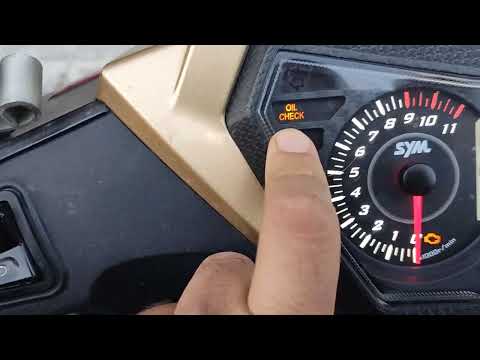
In order to reset the Oil Check light on the Sym VF 185, you need to turn on the instrument panel by turning the key in the ignition switch. Once the panel is on, you can press and hold the button located at the bottom right of the instrument panel for a few seconds. You will need to continue holding the button for a few seconds and then release it before pressing the next button. This will make the Oil Check light disappear from the instrument panel, and you can turn it off again by turning the key in the opposite direction. by ScegliAuto More videos
|
|
For advertising on this site Write to info@scegliauto.com
ScegliAuto is not responsible for any inaccuracy of the data in the lists. To report any inaccuracy or your business (if you own the business in question), please write to info@scegliauto.com
Number of seconds to generate the page: 0.005
(c) ScegliAuto 2026 - info@scegliauto.com - Privacy policy VAT number: IT01247470535 |
