
|
Do it yourself
| |||
| ||||


How to reset the TPMS on a 2019 Mini Cooper
Model: Mini Mini
F55, F54, F57, F56
- Years 2014-2023
In this video, we can see how to reset the tire monitoring system of the 2019 Mini Cooper: to do this, the car must be turned on, and we must have access to the "Home" screen on the onboard computer: simply click on the menu and we will return to the main screen. From here, we select the "MyMini" menu using the knobs and then click on "vehicle status" which will take us to a submenu where we select: "tire settings", where the tire pressures are detailed. Click and go to "reset". Click again and drive for a few minutes, the system will reset itself.
Posted on 29 June 2024 by ScegliAuto
Video tutorial
Related tutorials
Mini
(2014-2023 /
F55, F54, F57, F56)
If the TPMS warning light appears on the display of your Mini Cooper even in the absence of punctures, all you have to do is perform a manual reset o…

Mini
(2001-2007 /
R52, R50, R53)
To reset the tire pressure warning light on a Mini Cooper, turn on the instrument panel without starting the engine. Using the turn signal lever, acc…

Mini
(2017-2023 /
Countryman2, F60)
The TPMS system of the Mini Countryman alerts us if there is a decrease in tire pressure by turning on an orange warning light shaped like a tire sec…
Other guides you may be interested in
|
Frequently Asked QuestionsHow to Remove the Driver's Side Airbag (Steering Wheel) on a BMW 3 Series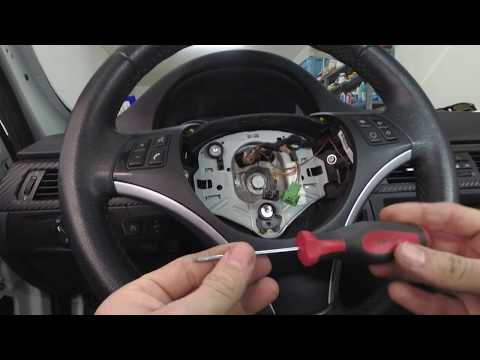
How to remove the driver's side airbag (steering wheel) on a BMW 3 Series? This operation is very simple if you follow the steps. Let's see in this guide how to proceed: insert a medium-length screwdriver into the rear slots on the steering wheel and turn until you release the clips that hold the airbag. Once the airbag is disconnected, disconnect the power connectors and remove it from the steering wheel. For reinstalling the airbag: connect the power connector, then press it onto the steering wheel until the locking clips snap into place inside the steering wheel. by ScegliAuto More videos
|

|
For advertising on this site Write to info@scegliauto.com
ScegliAuto is not responsible for any inaccuracy of the data in the lists. To report any inaccuracy or your business (if you own the business in question), please write to info@scegliauto.com
Number of seconds to generate the page: 0.054
(c) ScegliAuto 2026 - info@scegliauto.com - Privacy policy VAT number: IT01247470535 |
