
|
Do it yourself
| |||
| ||||


How to Set the Date and Time on the Peugeot 207
Model: Peugeot 207
MK 1
- Years 2006-2015
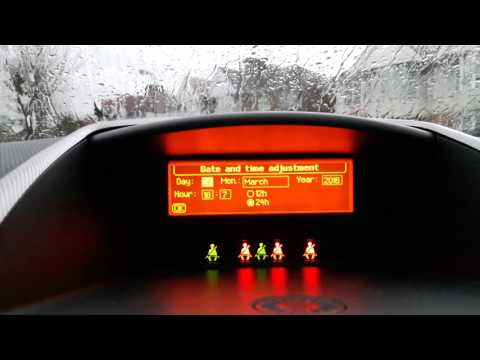
Let's see how to set the date and time on the Peugeot 207. Sit in the driver's seat, turn on the ignition, and press the "Menu" button on the radio. Use the arrow buttons to select "Display Settings" and confirm with "OK". The display will show "Time"; use the left/right buttons to select the value to set. Once selected, press the down arrow to move to the minutes. Repeat the same procedure and press the down arrow to navigate through the time format, year, month, and day of the date, repeating the same input method for all. Once completed, confirm with "OK", press "Menu", and finish with "Esc".
Updated on 20 July 2026 by ScegliAuto
Video tutorial
Related tutorials
Peugeot 207
(2006-2015 /
MK 1)
In this video, with the addition of verbal description, we see how to set the time and date in the Peugeot 207. It is very simple to do this and only…
Peugeot 207
(2006-2015 /
MK 1)
This tutorial shows you how to set the date and time in a Peugeot 207, a very simple and quick task to perform after a flat battery or when switching…

Peugeot 207
(2006-2015 /
MK 1)
Today we will explain how simple and fast it is to set the time and date on a 2010 Peugeot 207 car. To set a new date and time, we need to turn on th…
Other guides you may be interested in
|
How to Reset the Tyre Pressure Light on the Opel Grandland X
While driving, if you notice the tyre pressure warning light coming on, first check the actual inflation pressure of the tyres and, if necessary, restore the pressures recommended by the manufacturer. After restoring the correct pressures, you need to reset the warning light that has illuminated on the instrument cluster. To do this, locate the reset button on the lower central console. Press this button and hold it down for at least 3 seconds, after which the low pressure indication will turn off. by ScegliAuto More videos
|
|
For advertising on this site Write to info@scegliauto.com
ScegliAuto is not responsible for any inaccuracy of the data in the lists. To report any inaccuracy or your business (if you own the business in question), please write to info@scegliauto.com
Number of seconds to generate the page: 0.060
(c) ScegliAuto 2026 - info@scegliauto.com - Privacy policy VAT number: IT01247470535 |
