
|
Do it yourself
| |||
| ||||


How to change the date and time of the Audi Q7
If you have done some maintenance work on your car (such as replacing the battery) or simply the date and time settings have reset themselves then you have to set them correctly manually. To do this, start the car and move to the control panel located below the automatic gearshift lever. Locate and press the "Setup" button and immediately after the button located at the top left of the knob. At this point, use the same knob to navigate the menu and press it once to set the hour and minute digits, the date and the format of the latter. Once finished, exit the menu and turn off the ignition.
Posted on 27 January 2022 by ScegliAuto
Video tutorial
Related tutorials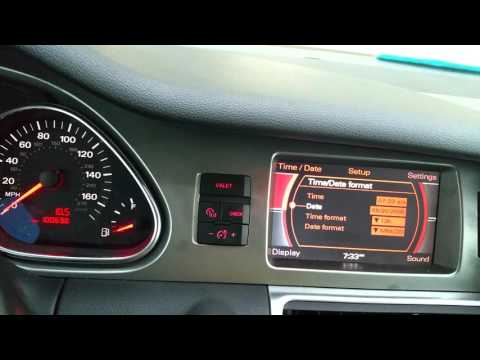
Audi Q7
(2006-2015 /
4L, MK 1)
In order to adjust the clock of the Audi Q7, you need to turn on the instrument panel by inserting the ignition key into the corresponding slot. Once…

Audi Q7
(2015-2024 /
4M, MK 2)
In the following article, we will show you how to replace the battery of the Audi Q7 remote/key. For this operation, no tools will be necessary. Firs…

Audi Q7
(2015-2024 /
4M, MK 2)
In today's video, we will see how to reset the TPMS light, which indicates tire pressure, on an Audi Q7, second generation model produced from 2015 t…
Other guides you may be interested in
|
How to Remove the Spark Plugs on a Subaru Forester
In this video, learn how to remove the spark plugs on a Subaru Forester. Pull the lever to open the engine compartment and lift the front bonnet, securing it. Remove the soundproofing panel covering the cylinder head, the air filter kit (if necessary), then disconnect the coils by hand, unscrew the spark plugs with your socket wrench, and pull them out of the cylinder head. Take the new spark plugs and guide them with the extension of the socket wrench into the cylinder head, tighten them properly, secure the ignition coils, refit the previously removed panel and the air filter kit. Close the engine bonnet. by ScegliAuto More videos
|

|
For advertising on this site Write to info@scegliauto.com
ScegliAuto is not responsible for any inaccuracy of the data in the lists. To report any inaccuracy or your business (if you own the business in question), please write to info@scegliauto.com
Number of seconds to generate the page: 0.067
(c) ScegliAuto 2026 - info@scegliauto.com - Privacy policy VAT number: IT01247470535 |
