
|
Do it yourself
| |||
| ||||


Ford Fusion North America - Warning light – error codeWarning Light – Error Code Ford Fusion North America (2013-2020 / mk 2) Ford Fusion North America (2006-2012 / MK 1) Resetting Oil Change on Ford Fusion In this useful tutorial, we will see how to reset the engine oil life independently on a first-generation Ford Fusion sedan produced from 2006 to 2012. Start …Read all… Posted on 27 September 2026 by ScegliAuto  Ford Fusion North America (2013-2020 / MK 2) Resetting the Oil Change Light on Ford Fusion Hybrid Let's see how to reset the oil change light on a Ford Fusion Hybrid, model produced from 2013 to 2020, using the controls on the left side of the steering …Read all… Posted on 24 September 2026 by ScegliAuto  Ford Fusion North America (2006-2012 / MK 1) Service Reset on a Ford Fusion In this very short video today, you will see how to perform a service reset on a Ford Fusion, first-generation sedan, without using diagnostic tools, but only …Read all… Posted on 14 September 2026 by ScegliAuto 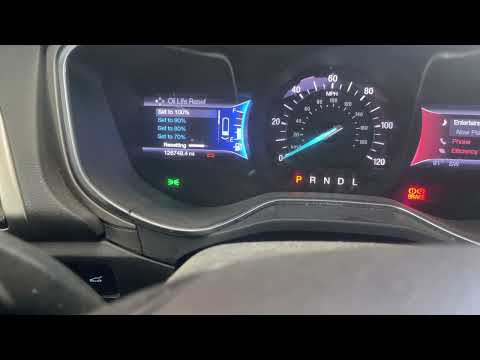 Ford Fusion North America (2013-2020 / MK 2) How to Reset the Maintenance Light on a 2013 Ford Fusion North America In this guide for all 2013 Ford Fusion North America Hybrid owners, discover the steps to manually reset the maintenance light that illuminates on the …Read all… Posted on 21 August 2026 by ScegliAuto  Ford Fusion North America (2013-2020 / MK 2) How to Reset the Battery Monitoring System of the Ford Fusion? In this tutorial, see how to reset the battery monitoring system of the Ford Fusion, known as the "Battery Monitor System", which manages energy savings, for …Read all… Posted on 9 August 2026 by ScegliAuto Warning Light – Error Code Ford Fusion North America (2006-2012 / mk 1)
Ford Fusion North America (2006-2012 / MK 1)Resetting Oil Change on Ford Fusion In this useful tutorial, we will see how to reset the engine oil life independently on a first-generation Ford Fusion sedan produced from 2006 to 2012. Start …Read all… Posted on 27 September 2026 by ScegliAuto
Ford Fusion North America (2013-2020 / MK 2)Resetting the Oil Change Light on Ford Fusion Hybrid Let's see how to reset the oil change light on a Ford Fusion Hybrid, model produced from 2013 to 2020, using the controls on the left side of the steering …Read all… Posted on 24 September 2026 by ScegliAuto
Ford Fusion North America (2006-2012 / MK 1)Service Reset on a Ford Fusion In this very short video today, you will see how to perform a service reset on a Ford Fusion, first-generation sedan, without using diagnostic tools, but only …Read all… Posted on 14 September 2026 by ScegliAuto
Ford Fusion North America (2013-2020 / MK 2)How to Reset the Maintenance Light on a 2013 Ford Fusion North America In this guide for all 2013 Ford Fusion North America Hybrid owners, discover the steps to manually reset the maintenance light that illuminates on the …Read all… Posted on 21 August 2026 by ScegliAuto
Ford Fusion North America (2013-2020 / MK 2)How to Reset the Battery Monitoring System of the Ford Fusion? In this tutorial, see how to reset the battery monitoring system of the Ford Fusion, known as the "Battery Monitor System", which manages energy savings, for …Read all… Posted on 9 August 2026 by ScegliAuto Shocks (1) Car stereo (2) Battery (2) Transmission (2) Key (10) Checks and maintenance (8) Headlight (2) Tail light (3) Air filter (2) Cabin air filter (2) Headlight bulb (3) License plate light (2) Handle (1) Engine oil (1) Clock (3) Door trim panel (2) Front bumper (2) Rear bumper (1) Shift knob (2) Fuel pump (2) Power window switch (1) Instrument cluster (1) Wheel (1) Fuse box (19) Seat (1) Parking sensors (1) Side mirror (2) Warning light – error code (5) Tire pressure warning light (5) Service warning light (11) Fuel cap (3) Blower motor (2) Side window (1) |
How to Set the Clock on a Fiat Scudo
Setting the time on a Fiat Scudo is a simple and quick operation. First, turn on the vehicle's onboard computer and then press the SET button located on the dashboard. The settings menu will appear on the display; press the "+" button to select the "TIME" option using the "SET" button. Once in the clock menu, you can choose the format and adjust the hours and minutes by pressing the "+", "-" and "SET" buttons. When finished, return to the main menu and then turn off the ignition to complete the reset. by ScegliAuto More videos
|
|
For advertising on this site Write to info@scegliauto.com
ScegliAuto is not responsible for any inaccuracy of the data in the lists. To report any inaccuracy or your business (if you own the business in question), please write to info@scegliauto.com
Number of seconds to generate the page: 0.007
(c) ScegliAuto 2026 - info@scegliauto.com - Privacy policy VAT number: IT01247470535 |
