
|
Do it yourself
| |||
| ||||


How to reset the tire pressure light on the Mini Cooper?
Model: Mini Mini
F57, F56, F55, F54
- Years 2014-2023
In this tutorial, we can see how to reset the tire pressure warning light in the Mini Cooper, an extremely simple and quick operation, to be reset only once the correct pressure of each tire has been restored following the instructions in the manual. First of all, let's go inside the cabin, then insert the key and turn on the instrument panel. Next, go to the settings menu on the main display, enter "Vehicle status" and select the second icon. Confirm the reset at this point and complete the procedure by restarting the instrument panel.
Posted on 20 December 2024 by ScegliAuto
Video tutorial
Related tutorials
Mini
(2001-2007 /
R52, R50, R53)
If the tire pressure warning light on your Mini Cooper R52 continues to stay on constantly on the instrument panel and you want to manually reset it,…

Mini
(2001-2007 /
R52, R50, R53)
To reset the tire pressure warning light of the Mini Cooper, you need to inflate the tires to the recommended pressure value: this value will be indi…

Mini
(2007-2014 /
R56, R57, R55)
Today's information will show us how to reset the tire pressure warning light on the Mini Cooper; before performing the TPMS sensor reset, it is nece…
Other guides you may be interested in
|
How to Remove the Door Panel on a Mini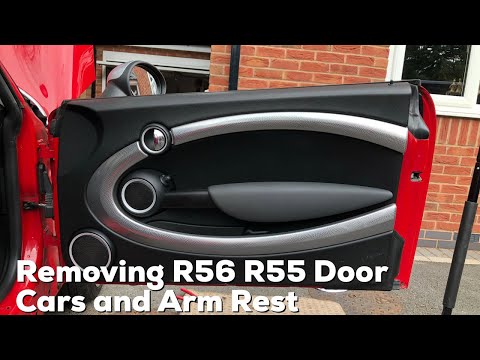
Perform the disassembly of the door panel (front right) on a Mini: disconnect the battery terminals located in the engine bay (if you need to disconnect terminals). Use a lever to remove the plastics in the area of the upper door opening lever and the screws present in the handle (if any). Remove the trim near the window, unscrew the remaining screws on the door panel and detach the securing clips. Finally, pull the panel away with your hands and detach it from the door (disconnect the power wiring and the opening cable). by ScegliAuto More videos
|

|
For advertising on this site Write to info@scegliauto.com
ScegliAuto is not responsible for any inaccuracy of the data in the lists. To report any inaccuracy or your business (if you own the business in question), please write to info@scegliauto.com
Number of seconds to generate the page: 0.097
(c) ScegliAuto 2026 - info@scegliauto.com - Privacy policy VAT number: IT01247470535 |
