
|
Do it yourself
| |||
| ||||


How to reset the tire pressure warning light on the Mini Countryman?
Model: Mini Mini
Countryman2, F60
- Years 2017-2023
In this tutorial we can see how to reset the tire pressure light in the Mini Countryman, an extremely simple and quick operation, to be done only once the correct pressure of each tire has been restored. First of all, let's go inside the car, then insert the key and turn on the instrument panel. Next, we reach the general menu on the central display, enter "MY MINI", "Vehicle Status", "Flat Tyre Monitor", "Tyre settings", and perform the reset by selecting the "Perform reset" option. To complete the procedure, simply restart the vehicle.
Posted on 26 June 2025 by ScegliAuto
Video tutorial
Related tutorials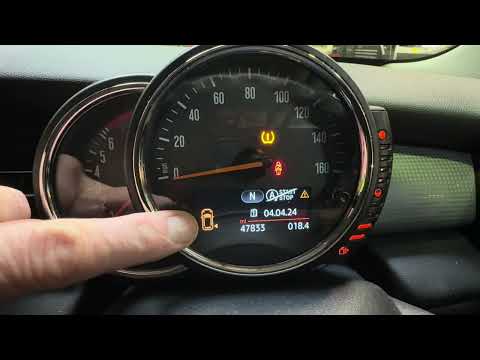
Mini
(2010-2016 /
R60, Countryman1)
If the orange tire pressure warning light on the instrument panel of your 2015 Mini Countryman continues to stay on, it means that the control unit h…

Mini
(2010-2016 /
R60, Countryman1)
The activation of the TPMS light indicates a possible puncture or pressure loss from one or more tires; in this guide we will see how to reset the ti…

Mini
(2017-2023 /
Countryman2, F60)
In this tutorial, we can see how to reset the tire pressure warning light in the Mini Countryman, a very simple and quick operation, to be done only …
Other guides you may be interested in
|
How to Change the Engine Oil on a Toyota Prius
How do you change the engine oil on a Toyota Prius? It’s a simple operation if you follow the right steps. Lift the car on a column lift or jack, after removing the cover panel, use a socket wrench to unscrew the bolt from the oil sump, allowing the fluid to drain into a disposal container. Refit the bolt of the oil sump and the oil filter. Lower the car and lift the bonnet, securing it. Finally, top up with the new oil. Measure the oil level multiple times with the metal dipstick until you reach the ideal measurement. by ScegliAuto More videos
|

|
For advertising on this site Write to info@scegliauto.com
ScegliAuto is not responsible for any inaccuracy of the data in the lists. To report any inaccuracy or your business (if you own the business in question), please write to info@scegliauto.com
Number of seconds to generate the page: 0.098
(c) ScegliAuto 2026 - info@scegliauto.com - Privacy policy VAT number: IT01247470535 |
