
|
Do it yourself
| |||
| ||||


Peugeot 1007 - Fuse boxFuse Box Peugeot 1007 (2005-2010 / mk 1)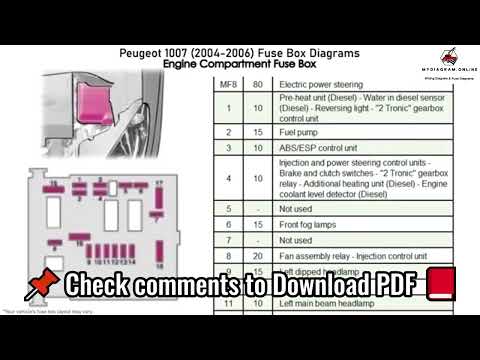 Peugeot 1007 (2005-2010 / MK 1) Fuse diagram of a Peugeot 1007 Through this very useful video guide today, we can see with precision all the fuse diagrams of a Peugeot 1007, a specific model registered from the year 2004 …Read all… Posted on 22 July 2025 by ScegliAuto  Peugeot 1007 (2005-2010 / MK 1) Where are the fuses located in the Peugeot 1007? The fuses of the Peugeot 1007 are located inside the appropriate fuse boxes that are installed on the vehicle: in this type of vehicle it will be possible to …Read all… Posted on 3 June 2025 by ScegliAuto  Peugeot 1007 (2005-2010 / MK 1) What is the fuse layout of the Peugeot 1007? If the devices of our Peugeot 1007 have suddenly stopped working, we can first of all check the status of the corresponding fuses whose diagrams are indicated …Read all… Posted on 12 May 2025 by ScegliAuto  Peugeot 1007 (2005-2010 / MK 1) What is the Fuse Diagram for the Peugeot 1007? If any of the various devices in your Peugeot 1007 suddenly stop working, the first thing to do is check the status of the respective fuses, whose location is …Read all… Posted on 7 September 2026 by ScegliAuto
Peugeot 1007 (2005-2010 / MK 1)Where to Find the Fuses on a Peugeot 1007 To replace the fuses in the Peugeot 1007's cabin, start by removing the cover located under the buttons for opening the doors, where you will find the fuses; …Read all… Posted on 22 July 2026 by ScegliAuto Battery (1) Body (1) Key (3) Timing belt (1) Onboard computer (1) Checks and maintenance (1) Fog lights (1) Air filter (1) Cabin air filter (3) Diesel fuel filter (1) Headlight bulb (1) (1) Clock (1) Door trim panel (1) Car door (7) Wheel (1) Fuse box (5) Seat (1) Door lock (1) Warning light – error code (1) Service warning light (3) |
How to Set the Time on the Central Display of the Toyota Yaris
Today, let's look at the instructions for adjusting the clock on the central display of the Toyota Yaris. First, get in the vehicle and turn on the instrument panel; then press and hold the button located to the right of the panel (next to the clock) until the time display starts to flash, as shown in the video. Now adjust the hour first, followed by the minutes, using the same button; finally, exit the time setting to save all changes made! by ScegliAuto More videos
|
|
For advertising on this site Write to info@scegliauto.com
ScegliAuto is not responsible for any inaccuracy of the data in the lists. To report any inaccuracy or your business (if you own the business in question), please write to info@scegliauto.com
Number of seconds to generate the page: 0.007
(c) ScegliAuto 2026 - info@scegliauto.com - Privacy policy VAT number: IT01247470535 |
