
|
Do it yourself
| |||
| ||||


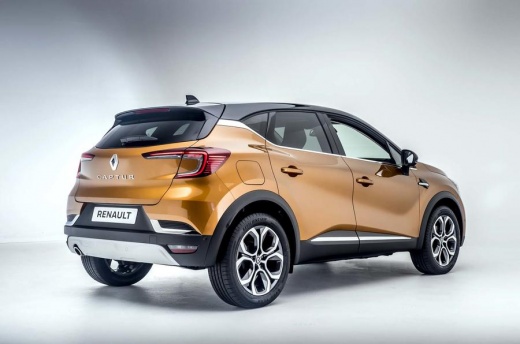
Three ways to open and close a Renault Captur MK2
Model: Renault Captur
MK 2
- Years:
2019, 2020, 2021, 2022, 2023, 2024, 2025, 2026
Video tutorial
In this video, we see the ways to open and close a Renault Captur MK2. The first method is completely Keyless: I approach with the key in my pocket and the car opens, I move away with the key in my pocket and the car closes. We then have an intermediate method, which is to press the button on the driver's handle. This button must be configured from the multimedia screen where we select "settings", then "car configuration", then "access" and we go to "lock on departure/unlock on approach" and set it to "off". This way, we will have to press the button to open and close the car. There is also the traditional method, which is opening and closing with the remote control: we go back to "settings" and "car configuration" then again "access" and select "hands-free lock/unlock" and set it to "off". We can then choose the method we prefer.
Posted on 2 April 2025 by ScegliAuto
Related tutorials
Renault Captur
(2019-2026 /
MK 2)
To disable the lock sound on the Renault Captur, enter the cabin and press the settings button located in the central menu. Then, select "Car Configu…

Renault Captur
(2019-2026 /
MK 2)
This guide shows how to adjust the parameters on the onboard computer of your Renault Captur MK2, so that all four windows lower simultaneously with …
Renault Captur
(2019-2026 /
MK 2)
Before you begin, sit in the driver's seat of your Renault Captur. Start by repeatedly pressing the selection button on the right side of the steerin…
ScegliAuto offers an extensive international collection of automotive tutorials available in 12 languages. Each guide combines instructional videos with original explanations written by experienced human editors, along with information about the car models covered.
Other guides you may be interested in
|
Resetting the Tyre Pressure Monitoring System (TPMS) Light on the Toyota Yaris
These brief and simple steps will show you how to reset the tyre pressure monitoring system (TPMS) light on the Toyota Yaris. Before resetting the light, ensure that all four tyres are at the correct operating pressure. Get inside the vehicle on the driver's side and locate the TPMS reset button found at the bottom left of the dashboard (next to the steering wheel); press and hold it until the TPMS light on the instrument cluster resets, following the video until the end! by ScegliAuto More videos
|
|
For advertising on this site Write to info@scegliauto.com
ScegliAuto is not responsible for any inaccuracy of the data in the lists. To report any inaccuracy or your business (if you own the business in question), please write to info@scegliauto.com
Number of seconds to generate the page: 0.074
(c) ScegliAuto 2026 - info@scegliauto.com - Privacy policy - About us VAT number: IT01247470535 |
