
|
Do it yourself
| |||
| ||||



How to Reset the Oil Service on a Suzuki S-Cross?
Model: Suzuki S Cross
MK 1
- Years:
2013, 2014, 2015, 2016, 2017, 2018, 2019
Video tutorial
In this tutorial, you will see how to reset the oil service on a Suzuki S-Cross, a very simple and quick operation. Before proceeding, ensure that you have completed all scheduled maintenance tasks. Start by entering the cabin and turning on the instrument cluster. Then, press and hold the long button located to the right of the speedometer until the menu appears on the display. Scroll down by rotating the same button, reach the "Oil change" option, and select it. At this point, simply perform the reset using the appropriate option and restart the vehicle.
Updated on 1 July 2026 by ScegliAuto
Related tutorials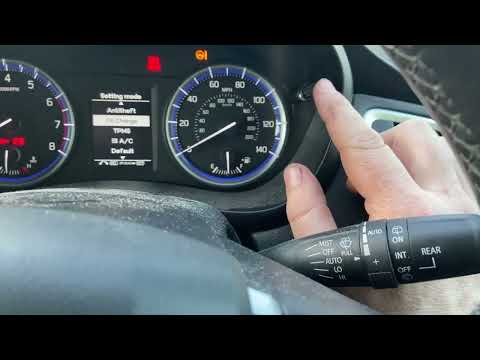
Suzuki S Cross
(2013-2019 /
MK 1)
.. reset the service warning light on the Suzuki S-Cross. First, get in the vehicle and turn on the ignition by pressing the start button once; then wait.. …

Suzuki S Cross
(2021-2026 /
MK 2)
.. how to reset the service light on the Suzuki S-Cross, a very simple and quick operation to be performed only after completing all scheduled maintenance.. …

Suzuki S Cross
(2021-2026 /
MK 2)
.. to reset the service indicator on the Suzuki S-Cross, a very simple and quick operation to perform only after completing all required scheduled maintenance.. …
Other guides you may be interested in
|
How to Reset the Tyre Pressure Warning Light on a Peugeot 2008?
On the instrument cluster of the Peugeot 2008, the tyre pressure warning light that appears can be reset by turning on the ignition, allowing access to the menu that will appear on the central display: press the button with the car icon located just below the display. At this point, scroll through the screen that appears, selecting the option that allows you to reset the tyre warning light: selecting it will bring up a confirmation message, where you can select "Yes" to completely reset the low pressure warning light. by ScegliAuto More videos
|
|
For advertising on this site Write to info@scegliauto.com
ScegliAuto is not responsible for any inaccuracy of the data in the lists. To report any inaccuracy or your business (if you own the business in question), please write to info@scegliauto.com
Number of seconds to generate the page: 0.018
(c) ScegliAuto 2026 - info@scegliauto.com - Privacy policy VAT number: IT01247470535 |
