
|
Do it yourself
| |||
| ||||


How to Reset the TPMS Light on a 2017 Suzuki Swift
Model: Suzuki Swift
MK 6, A2L
- Years 2017-2024
If the orange TPMS light related to tyre pressure keeps coming on in your 2017 Suzuki Swift and you want to reset it manually, follow the steps in this guide. First, get inside the car and start the ignition. Next, press and hold the button located below the speedometer and release it when the new menu appears. Scroll down and select "TPMS". Finally, select "TPMS mode" and "Comfort mode". Exit the menu and the procedure is complete.
Updated on 2 July 2026 by ScegliAuto
Video tutorial
Related tutorials
Suzuki Swift
(2017-2024 /
MK 6, A2L)
In the following guide dedicated to all owners of a latest model Suzuki Swift, we will find out how to correctly reset the TPMS warning light if it c…

Suzuki Swift
(2017-2024 /
MK 6, A2L)
If the orange tire pressure warning light on the instrument panel of your Suzuki Swift continues to remain on despite no loss of pressure, do not wor…

Suzuki Swift
(2017-2024 /
MK 6, A2L)
The tire pressure sensor of the Suzuki Swift can be reset by checking that all four tires are at the correct inflation pressure. Afterwards, you will…
Other guides you may be interested in |
Frequently Asked QuestionsHow to Unlock the Sony Radio in a Ford Focus?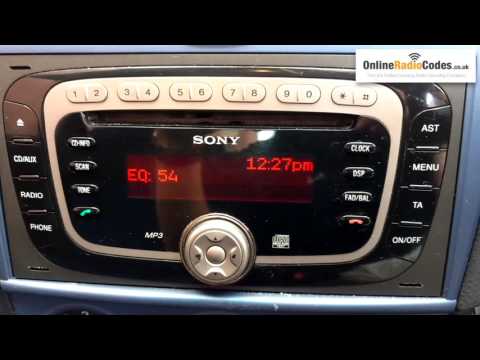
To unlock the Sony radio in a Ford Focus, turn on the ignition so that the radio can also be powered on. Next, press and hold the buttons 1 and 6 on the top of the radio until the serial number of the device appears. This number should then be entered into specific websites: this will allow you to obtain the unlock code for the radio. By entering this four-digit code, you will be able to unlock the radio for use until it is reset again. by ScegliAuto More videos
|
|
For advertising on this site Write to info@scegliauto.com
ScegliAuto is not responsible for any inaccuracy of the data in the lists. To report any inaccuracy or your business (if you own the business in question), please write to info@scegliauto.com
Number of seconds to generate the page: 0.054
(c) ScegliAuto 2026 - info@scegliauto.com - Privacy policy VAT number: IT01247470535 |
