
|
Do it yourself
| |||
| ||||


Tata Tiago - KeyKey Tata Tiago (2016-2024 / mk 1) Tata Tiago (2016-2024 / MK 1) How to Replace the Key Battery on a Tata Tiago To replace the remote key battery on this car model, the description below and the video provide all the useful instructions and the procedure to follow for a …Read all… Posted on 1 November 2026 by ScegliAuto  Tata Tiago (2016-2024 / MK 1) How to Open the Door of the Tata Tiago if the Smart Key Doesn't Work If the smart key for your Tata Tiago suddenly stops working and you can't open the door, don't worry because this guide will show you how to solve the problem. …Read all… Posted on 5 August 2026 by ScegliAuto 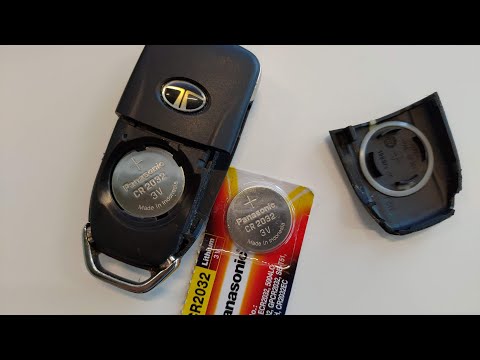 Tata Tiago (2016-2024 / MK 1) How to Replace the Key Battery of the Tata Tiago If the key of your Tata Tiago suddenly stops working or has continuous signal drops, you need to replace the battery. This is a simple task that you can do on …Read all… Posted on 13 July 2026 by ScegliAuto Air conditioning (1) Car stereo (1) Battery (7) Body (1) Key (3) Checks and maintenance (2) Air filter (2) Cabin air filter (1) Accessory kit (1) Side marker bulb (1) Headlight bulb (1) Engine oil (2) Door trim panel (1) Brake pads (2) Shift knob (1) Pump (1) Wheel (1) Fuse box (3) Warning light – error code (2) Tire pressure warning light (3) Service warning light (15) Windshield wipers (2) |
How do you reset the tyre pressure warning light on a Hyundai Kona?
Inflate the tyres to the correct pressure to reset the tyre pressure warning light on your Hyundai Kona. Find the recommended pressures on the sticker on the driver's door pillar. Once the tyres are correctly inflated, get into the car and switch on the ignition. Wait a few seconds for the warning light to go out. If it stays on, drive for a few miles until it goes out completely. by ScegliAuto More videos
|
|
For advertising on this site Write to info@scegliauto.com
ScegliAuto is not responsible for any inaccuracy of the data in the lists. To report any inaccuracy or your business (if you own the business in question), please write to info@scegliauto.com
Number of seconds to generate the page: 0.005
(c) ScegliAuto 2026 - info@scegliauto.com - Privacy policy - About us VAT number: IT01247470535 |
