
|
Do it yourself
| |||
| ||||


How to reset the "Service" light on an Audi A1?
Model: Audi A1
8X, MK 1
- Years 2010-2018
To reset the "Service" light on an Audi A1, turn on the instrument panel without starting the engine. Use the button located below the panel to access the onboard computer settings menu. Scroll through the various options displayed on the screen until you find the one dedicated to maintenance or service intervals. When you locate the reset option, select it and hold down the button until the system confirms the update and the warning is removed. Finish the operation by turning off and on the instrument panel to ensure that the indicator has been successfully removed. This procedure allows the system to update the data for future maintenance monitoring.
Posted on 14 December 2024 by ScegliAuto
Video tutorial
Related tutorials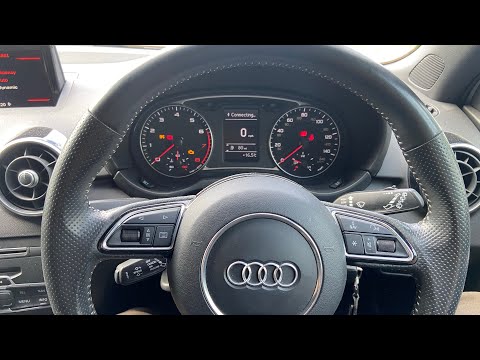
Audi A1
(2010-2018 /
8X, MK 1)
To reset the "Service" light on an Audi A1, start by turning on the instrument panel without starting the engine. Then, use the controls on the centr…

Audi A1
(2010-2018 /
8X, MK 1)
In addition to using the OBD port, you can reset the service light on the Audi A1 through the MMI system. To do this, after fully starting the system…

Audi A1
(2010-2018 /
8X, MK 1)
In this video we can see how it is possible to reset the service light of the Audi A1 8X version even though it would be expected that to do this ope…
Other guides you may be interested in
|
How to Check the Oil Level on a Jeep Renegade?
To check the oil level on a Jeep Renegade, you need to open the bonnet to access the components inside the engine bay: on the lower left side of the engine block, you will find the dipstick for checking the level. This should be pulled out and thoroughly cleaned with a cloth: once cleaned, reinsert it back into its tube and pull it out immediately after. This way, you can check that the oil mark is between the minimum and maximum levels; finally, you can place the dipstick back in its tube. by ScegliAuto More videos
|

|
For advertising on this site Write to info@scegliauto.com
ScegliAuto is not responsible for any inaccuracy of the data in the lists. To report any inaccuracy or your business (if you own the business in question), please write to info@scegliauto.com
Number of seconds to generate the page: 0.086
(c) ScegliAuto 2026 - info@scegliauto.com - Privacy policy VAT number: IT01247470535 |
