
|
Do it yourself
| |||
| ||||


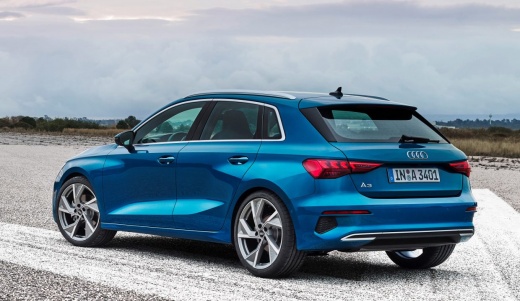
How to Activate and Set the Cruise Control on an Audi A3
Model: Audi A3
8Y, MK 4
- Years:
2020, 2021, 2022, 2023, 2024, 2025, 2026
Video tutorial
Today, we will cover how to activate and set the cruise control on an Audi A3. First, get in the vehicle and locate the cruise control activation and setting controls on the left lever of the steering wheel. To activate the cruise control, reach a minimum speed, then set the speed using the plus and minus buttons (moving the lever up or down) as shown in the video. Press the activation button again or tap the brake pedal to disable the system.
Posted on 5 October 2026 by ScegliAuto
Related tutorials
Audi A3
(2012-2019 /
MK 3, 8V)
You can activate the Driving School mode on the Audi A3 by connecting a diagnostic tool to the vehicle's OBD port, located below the steering column:…
Audi A3
(2003-2013 /
8P, MK 2)
In this video, you will see the procedure to activate the climate menu in your Audi A3. First, turn on your vehicle. Next, focus on the buttons below…
Audi A3
(2012-2019 /
MK 3, 8V)
Learn how to set/adjust the headlights on an Audi A3. To adjust the brightness of the headlights: enter the cabin, switch on the instrument cluster, …
ScegliAuto offers an extensive international collection of automotive tutorials available in 12 languages. Each guide combines instructional videos with original explanations written by experienced human editors, along with information about the car models covered.
Other guides you may be interested in
|
How do you reset the tyre pressure warning light on a Hyundai Kona?
Inflate the tyres to the correct pressure to reset the tyre pressure warning light on your Hyundai Kona. Find the recommended pressures on the sticker on the driver's door pillar. Once the tyres are correctly inflated, get into the car and switch on the ignition. Wait a few seconds for the warning light to go out. If it stays on, drive for a few miles until it goes out completely. by ScegliAuto More videos
|
|
For advertising on this site Write to info@scegliauto.com
ScegliAuto is not responsible for any inaccuracy of the data in the lists. To report any inaccuracy or your business (if you own the business in question), please write to info@scegliauto.com
Number of seconds to generate the page: 0.029
(c) ScegliAuto 2026 - info@scegliauto.com - Privacy policy - About us VAT number: IT01247470535 |
