
|
Do it yourself
| |||
| ||||


Model: Bmw R1250 Gs
In this tutorial, we can see how to reset the service on the BMW R1250 GS, a very simple and quick operation to be performed only after completing all scheduled maintenance tasks. To do this, we will need the specific device shown in the video, which can be easily found online, and the corresponding app to install on the smartphone. First, we connect the device to the OBD socket accessible from the right side panel, then we turn on the instrument panel and pair the smartphone via the app. Next, we select the model from the list, enter "Instrument Cluster," "Service Reset," set the desired interval, and select "Reset.
Posted on 15 January 2026 by ScegliAuto
Video tutorial
Related tutorials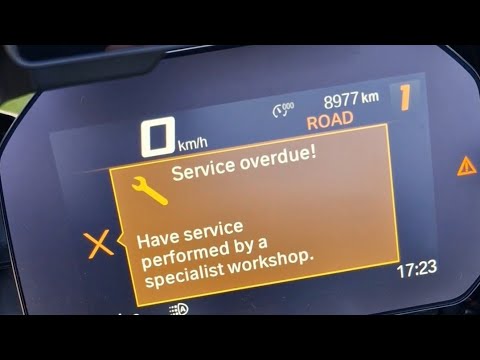
R1250 Gs
Resetting the service on the BMW R1250 GS, as shown in this tutorial, is an extremely simple and quick operation. Before proceeding, ensure you have …

R1250 Gs
The service light on the display of the BMW R1250 Gs indicates that it is necessary to perform maintenance. After performing the maintenance, we proc…

R1250 Gs
To change the engine oil of a BMW R1250 GS, start by placing the motorcycle on a flat surface. Then, lift the motorcycle on the center stand. Remove …
|
How to Replace the Headlight Bulbs on the KTM RC 200?
As shown in this tutorial, replacing the headlight bulbs on the KTM RC 200 is an extremely simple and quick task. First, ensure that the key is not inserted for safety. Then, approach the headlight in question, locate the bulb holder, and turn it slightly counter-clockwise. Once done, disconnect the power connector, attach the new bulb, and reassemble everything. Avoid touching the glass of the replacement bulb directly with your bare hands, as any residues could cause it to overheat. by ScegliAuto More videos
|
|
For advertising on this site Write to info@scegliauto.com
ScegliAuto is not responsible for any inaccuracy of the data in the lists. To report any inaccuracy or your business (if you own the business in question), please write to info@scegliauto.com
Number of seconds to generate the page: 0.690
(c) ScegliAuto 2026 - info@scegliauto.com - Privacy policy VAT number: IT01247470535 |
