
|
Do it yourself
| |||
| ||||


How to Replace the Battery and Clean the Remote for the Ford Figo Aspire Mk2
Model: Ford Figo Aspire
MK 2
- Years 2015-2021
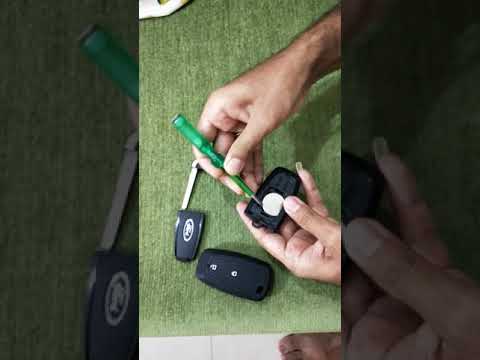
This guide shows how to replace the battery and clean the remote for the Ford Figo Aspire Mk2. The first step is to open the key fob and, using a small plastic pry tool, lift and open the back cover of the remote; pry on all sides to disconnect all the retaining clips. Remove the old battery by prying it out from the edge. Use a small flathead screwdriver to remove the retaining screw of the cover; pry between the two sides of the remote to open it completely. At this point, you can remove the circuit board and clean the piece. To reassemble, simply follow the steps in reverse.
Updated on 24 May 2026 by ScegliAuto
Video tutorial
Related tutorials
Ford Figo Aspire
(2015-2021 /
MK 2)
In order to replace the battery of the Ford Figo Aspire remote control, you need to pry with an object like a screwdriver inside the groove located i…
Ford Figo Aspire
(2015-2021 /
MK 2)
Replacing the remote battery in a Ford Aspire, as shown in this tutorial, is an extremely simple and quick task. For this, you will need a small flat…

Ford Figo Aspire
(2015-2021 /
MK 2)
If the button battery inside your Ford Figo Aspire key is completely dead and needs replacing, you must read this mini guide. With the following meth…
Other guides you may be interested in
|
How to Replace the Cabin Filter on the Opel Grandland X
If you own an Opel Grandland X and want to know the steps to replace the cabin air filter, carefully read the following guide and follow the described steps. First, enter the vehicle and go to the passenger side. Then, locate the box containing the air filter in the lower side area of the dashboard. Remove the cover of the box and finally replace the old filter with the new one. Refit the cover, and you are done. by ScegliAuto More videos
|
|
For advertising on this site Write to info@scegliauto.com
ScegliAuto is not responsible for any inaccuracy of the data in the lists. To report any inaccuracy or your business (if you own the business in question), please write to info@scegliauto.com
Number of seconds to generate the page: 0.236
(c) ScegliAuto 2026 - info@scegliauto.com - Privacy policy VAT number: IT01247470535 |
