
|
Do it yourself
| |||
| ||||


IVECO Daily - SeatSeat IVECO Daily (2014-2026 / mk 5) IVECO Daily (2014-2026 / MK 5) Important details in the Iveco Daily In this video, you will see how every detail is important in the Iveco Daily and how it is possible to utilise every single space in this commercial vehicle to …Read all… Posted on 24 September 2026 by ScegliAuto  IVECO Daily (2006-2020 / MK 4) How to Install a Recycled Swivel Seat on an Iveco Daily Camper This video shows how to take a standard seat from a Ford Galaxy and, with a small modification, transform it into a swivel seat for our Iveco Daily camper. The …Read all… Posted on 21 September 2026 by ScegliAuto  IVECO Daily (2006-2020 / MK 4) How to Remove the Seat from an Iveco Daily 2008 In this video, we can see how to replace the seat in this vehicle, which is in poor condition and needs to be replaced to ensure greater comfort for the …Read all… Posted on 8 July 2026 by ScegliAuto Seat IVECO Daily (2006-2020 / mk 4)
IVECO Daily (2014-2026 / MK 5)Important details in the Iveco Daily In this video, you will see how every detail is important in the Iveco Daily and how it is possible to utilise every single space in this commercial vehicle to …Read all… Posted on 24 September 2026 by ScegliAuto
IVECO Daily (2006-2020 / MK 4)How to Install a Recycled Swivel Seat on an Iveco Daily Camper This video shows how to take a standard seat from a Ford Galaxy and, with a small modification, transform it into a swivel seat for our Iveco Daily camper. The …Read all… Posted on 21 September 2026 by ScegliAuto
IVECO Daily (2006-2020 / MK 4)How to Remove the Seat from an Iveco Daily 2008 In this video, we can see how to replace the seat in this vehicle, which is in poor condition and needs to be replaced to ensure greater comfort for the …Read all… Posted on 8 July 2026 by ScegliAuto Cigarette lighter (1) Airbag (1) Air conditioning (1) Car stereo (20) Battery (3) Transmission (2) Body (4) Key (2) Timing belt (29) V-belt (1) Onboard computer (11) Checks and maintenance (28) Throttle body (1) Dashboard (8) Bearing (2) Differential (1) Brake rotors (1) Side marker light (1) Headlight (2) Tail light (1) Fog lights (1) Diesel particulate filter (1) Air filter (1) Cabin air filter (11) Fuel filter (1) Diesel fuel filter (3) Parking brake (3) Clutch (1) Light bulb (1) Side marker bulb (2) Headlight bulb (4) Antifreeze coolant (1) Instrument panel light (1) License plate light (1) Engine (2) Starter motor (2) Engine oil (1) Clock (35) Brake pads (3) Shift knob (2) Pump (1) Fuel pump (2) Instrument cluster (5) Radiator (1) Heater core (2) Wheel (2) Fuse box (76) Seat (3) Crankshaft position sensor (1) Side mirror (11) AdBlue warning light (1) Warning light – error code (23) Tire pressure warning light (1) Service warning light (76) EGR valve (2) Blower motor (2) |
How to Set the Clock in a Ford Transit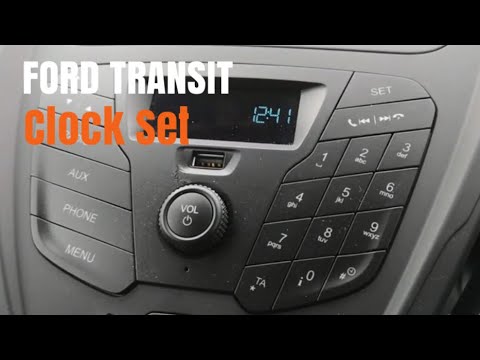
In this tutorial, you will learn how to set the time in a 2019 Ford Transit van. First, get into the vehicle and turn on the instrument cluster without starting the engine. Next, use the controls located in the centre of the cabin. Press the central power button, then click the set button, select the set time option, and finally press the OK button. Adjust the desired time using the button with the arrow icons; first set the hour, then press OK and set the minutes, confirming by pressing the OK button again. by ScegliAuto More videos
|
|
For advertising on this site Write to info@scegliauto.com
ScegliAuto is not responsible for any inaccuracy of the data in the lists. To report any inaccuracy or your business (if you own the business in question), please write to info@scegliauto.com
Number of seconds to generate the page: 0.008
(c) ScegliAuto 2026 - info@scegliauto.com - Privacy policy - About us VAT number: IT01247470535 |
