
|
Do it yourself
| |||
| ||||


Change of time on the tachograph of the Fiat Daily.
Model: IVECO Daily
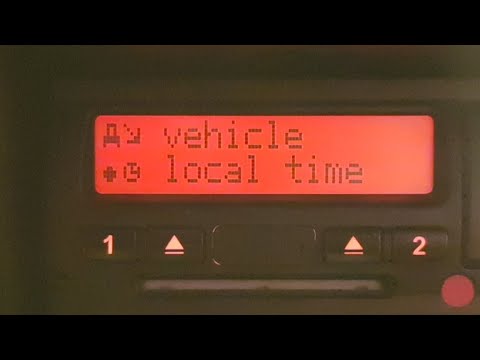
When the transition from daylight saving time to standard time and vice versa occurs, we must change the time indication of the Fiat Daily's tachograph to keep this tool up to date. We operate on the four-way button to the right of the display of the device and press "Ok", then using the arrow keys we select the "Vehicle Entry" option, confirm with "Ok" and always with the arrows select "Local Time", confirm always with "Ok", using the arrow keys set the new time and always confirm with the "Ok" button. The time indication of the tachograph has been updated.
Posted on 6 April 2023 by ScegliAuto
Video tutorial
Related tutorials
IVECO Daily
(2014-2024 /
MK 5)
Let's see how to change the time from daylight saving time to standard time (and vice versa) on the VDO tachograph of a Fiat Daily. This is a very im…
IVECO Daily
(2006-2020 /
MK 4)
In this video, we see how to change the time on the tachograph of an Iveco Daoly when there is a change from daylight saving time to standard time. W…

IVECO Daily
(2014-2024 /
MK 5)
Let's see in this video how to change the time on the digital tachograph of the Iveco Daily. Digital tachographs use two time references: UTC (Coordi…
Other guides you may be interested in
|
How to Remove the Front Seats from a Classic Fiat 500
How to remove the front seats from a classic Fiat 500? In this video, follow these steps: first, slide the seats forward and lift them up, then unscrew the retaining bolts on the rails fixed to the car's chassis using a socket or impact driver (use appropriate release agents if the bolts do not unscrew). Remove the retaining bolts at the bottom of the car (use spanners on both the upper and lower parts of the connecting bolts). Finally, install the new front seat by following the disassembly steps mentioned earlier. by ScegliAuto More videos
|
|
For advertising on this site Write to info@scegliauto.com
ScegliAuto is not responsible for any inaccuracy of the data in the lists. To report any inaccuracy or your business (if you own the business in question), please write to info@scegliauto.com
Number of seconds to generate the page: 0.103
(c) ScegliAuto 2026 - info@scegliauto.com - Privacy policy VAT number: IT01247470535 |
