
|
Do it yourself
| |||
| ||||


How to reset the service on the KTM 1290 Super Duke?
Model: Ktm 1290 Super Duke R
Video tutorial
In this tutorial, we can see how to reset the service on the KTM 1290 Super Duke, an extremely simple and quick operation, to be done only once all scheduled maintenance work has been completed. Let's start by inserting the key and turning on the instrument panel, then we reach the "Settings" screen using the directional arrows on the left handlebar. Next, hold down both the up arrow and the down arrow for about 5 seconds to activate the maintenance menu, and reset both intervals. To complete the procedure, simply return to the main screen.
Posted on 17 October 2025 by ScegliAuto
Related tutorials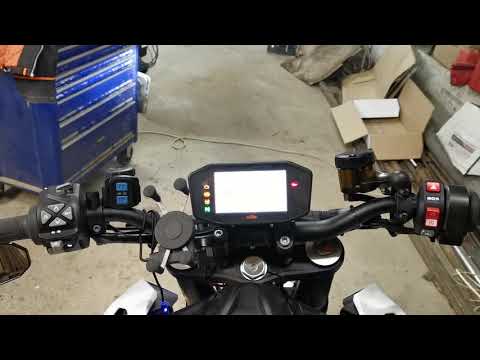
1290 Super Duke R
.. In this tutorial, you will see how to reset the service on the KTM 1290 Super Duke R, an extremely simple and quick operation to perform.. …

1290 Super Duke R
.. In this tutorial, you will learn how to reset the service on the KTM 1290 Super Duke R, a very simple and quick operation. Before doing.. …

1290 Super Duke R
In order to reset the Service light of the KTM 1290 Super Duke R, you need to turn on the instrument panel by inserting the ignition key into the ign…
|
How to Remove the Engine from the KTM XC-W 300?
To remove the engine from the KTM XC-W 300, loosen the bolts that secure it to its housing in the centre of the frame: once the support bolts are removed, proceed to loosen the bolts securing the exhausts and then disconnect all related connectors. At this point, remove the pin and ring that secure the piston to the connecting rod: you can now access the crankshaft and all other internal components. After any necessary replacement, reassemble the engine to ensure everything functions correctly. by ScegliAuto More videos
|
|
For advertising on this site Write to info@scegliauto.com
ScegliAuto is not responsible for any inaccuracy of the data in the lists. To report any inaccuracy or your business (if you own the business in question), please write to info@scegliauto.com
Number of seconds to generate the page: 0.004
(c) ScegliAuto 2026 - info@scegliauto.com - Privacy policy VAT number: IT01247470535 |
