
|
Do it yourself
| |||
| ||||


Maserati Levante - KeyKey Maserati Levante (2016-2024 / mk 1) Maserati Levante (2016-2024 / MK 1) How to change the battery of the key remote for a Maserati Levante. As we can see in this video tutorial, replacing the battery of the key remote for a Maserati Levante car requires a series of steps. First, remove the metal …Read all… Posted on 4 August 2025 by ScegliAuto  Maserati Levante (2016-2024 / MK 1) How to Replace the Key Battery of the Maserati Levante If you want to replace the button battery inside your Maserati Levante key yourself, carefully read this mini guide dedicated to you and follow the …Read all… Posted on 15 August 2026 by ScegliAuto  Maserati Levante (2016-2024 / MK 1) How to Replace the Key Battery in the 2017 Maserati Levante Replacing the battery in your 2017 Maserati Levante key requires attention and patience, but if you follow the instructions below carefully, you will complete …Read all… Posted on 4 August 2026 by ScegliAuto  Maserati Levante (2016-2024 / MK 1) How to Open the Remote Key of a Maserati Levante to Replace the Battery How to open the remote key of a Maserati Levante to replace the battery? Take your remote key and extract the metal key. Once removed, unscrew the screw and …Read all… Posted on 1 April 2026 by ScegliAuto Battery (1) Key (4) Tail light (1) Air filter (1) Instrument cluster (1) Fuse box (2) Suspension system (1) AdBlue warning light (1) Warning light – error code (2) Service warning light (14) |
What does the "Code 82" message indicate in the Chevrolet Orlando and how to remove it?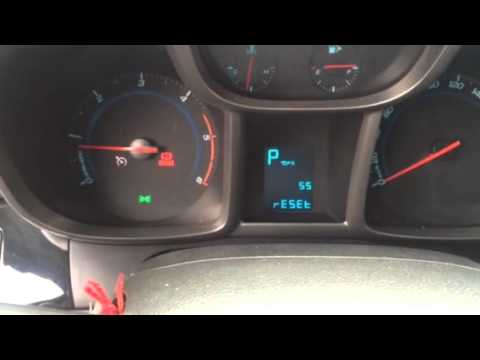
If the "Code 82" message appears on the dashboard of your Chevrolet Orlando, it means that the service interval in miles or time has been reached. Once all scheduled maintenance tasks are completed, you can remove the warning by following the simple procedure shown in this tutorial. First, insert the key and turn on the ignition, then press the "MENU" button located on the left control stalk and navigate to the screen displaying the "Reset" option. At this point, press the "SET/CLR" button at the end of the same stalk and confirm the reset. by ScegliAuto More videos
|
|
For advertising on this site Write to info@scegliauto.com
ScegliAuto is not responsible for any inaccuracy of the data in the lists. To report any inaccuracy or your business (if you own the business in question), please write to info@scegliauto.com
Number of seconds to generate the page: 0.006
(c) ScegliAuto 2026 - info@scegliauto.com - Privacy policy - About us VAT number: IT01247470535 |
