
|
Do it yourself
| |||
| ||||



How to Reset the Service Light on a Mercedes CLA 250
Model: Mercedes CLA
C117, X117
- Years:
2013, 2014, 2015, 2016, 2017, 2018, 2019
Video tutorial
This article explains the procedure to reset the maintenance light on a 2016 Mercedes CLA 250. The procedure does not require software or tools. First, insert the key and turn it to position 1. Then, press and hold both the phone button and the OK button for 5 seconds. This will open the menu. Scroll down to the ASSYST PLUS option and select it. Next, choose the complete service option, then select confirm complete service. Now, select the type of oil used for the engine oil change, confirm, and then confirm that you want to reset. The procedure is now complete, and you can restart the instrument cluster to verify that the procedure was successful.
Updated on 23 October 2026 by ScegliAuto
Related tutorials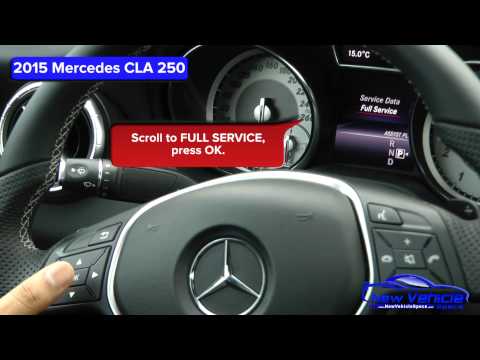
Mercedes CLA
(2013-2019 /
C117, X117)
Learn how to reset the maintenance light on a Mercedes CLA 250, produced from 2013 to 2019. Turn on the vehicle's ignition and scroll to the mileage …

Mercedes CLA
(2019-2025 /
C118, X118)
After performing the routine maintenance service, you will need to reset the service light for the engine oil change on the Mercedes CLA. First, get …

Mercedes CLA
(2013-2019 /
C117, X117)
Today, we will learn how to reset the service reminder for routine maintenance on a Mercedes CLA. First, get in the vehicle and turn on the ignition.…
Other guides you may be interested in
|
How to Set the Clock on a Fiat Scudo
Setting the time on a Fiat Scudo is a simple and quick operation. First, turn on the vehicle's onboard computer and then press the SET button located on the dashboard. The settings menu will appear on the display; press the "+" button to select the "TIME" option using the "SET" button. Once in the clock menu, you can choose the format and adjust the hours and minutes by pressing the "+", "-" and "SET" buttons. When finished, return to the main menu and then turn off the ignition to complete the reset. by ScegliAuto More videos
|
|
For advertising on this site Write to info@scegliauto.com
ScegliAuto is not responsible for any inaccuracy of the data in the lists. To report any inaccuracy or your business (if you own the business in question), please write to info@scegliauto.com
Number of seconds to generate the page: 0.200
(c) ScegliAuto 2026 - info@scegliauto.com - Privacy policy VAT number: IT01247470535 |
