
|
Do it yourself
| |||
| ||||


How to reset the service in the MG 5?
Model: MG 5
Ap12
- Years 2012-2018
As we can see in this tutorial, resetting the service in MG 5 is a very simple and fast operation. Before proceeding, we will of course have to complete all required maintenance work. Let's start by turning on the instrument panel, then, using the directional buttons located in the right area of the steering wheel, we scroll the display screens until we reach the settings one, where we will select the "Next service" item. At this point, as indicated on the display itself, keep the "OK" key pressed for about 15 seconds, or in any case for the time necessary for the interval to be correctly reset.
Posted on 21 April 2022 by ScegliAuto
Video tutorial
Related tutorials
MG 5
(2012-2018 /
Ap12)
In this new mini guide, we will explain how to correctly perform the manual reset of the service light on the instrument panel of your MG 5. First, g…

MG 5
(2012-2018 /
Ap12)
If you own a first series MG 5 and want to independently reset the oil warning light that continues to stay on the instrument panel, just follow the …

MG 5
(2012-2018 /
Ap12)
The following video tutorial shows us how to reset the TPMS light on an MG 5 vehicle; The reset follows a simple and quick procedure to be carried ou…
Other guides you may be interested in
|
How to Remove the Air Vents on an Alfa Romeo 159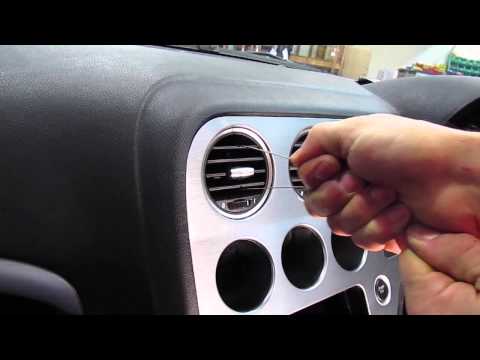
This video shows how to remove the air vents on an Alfa Romeo 159. Start by using a plastic trim tool to detach the air vents located in the central dashboard; if you have difficulty, obtain metal hooks (as shown in the video) and insert them into the air vent. Once the two hooks are secured to the edges of the air vent, pull them out with your hands until the vent is removed from its housing. Repeat this procedure for the other air vents present on the car's dashboard. Finally, install the new vents. by ScegliAuto More videos
|
|
For advertising on this site Write to info@scegliauto.com
ScegliAuto is not responsible for any inaccuracy of the data in the lists. To report any inaccuracy or your business (if you own the business in question), please write to info@scegliauto.com
Number of seconds to generate the page: 0.126
(c) ScegliAuto 2026 - info@scegliauto.com - Privacy policy VAT number: IT01247470535 |
