
|
Do it yourself
| |||
| ||||


How to Open the Boot of the Ford Ecosport
Model: Ford Ecosport
BK, MK 1
- Years:
2012, 2013, 2014, 2015, 2016, 2017, 2018, 2019, 2020, 2021, 2022, 2023
Video tutorial
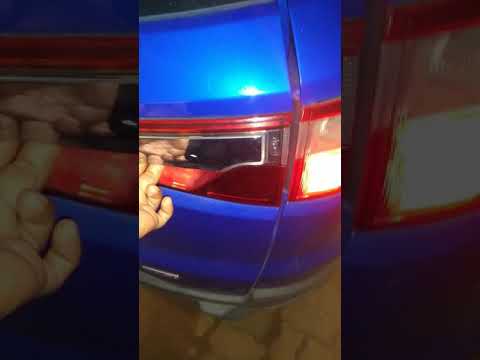
Opening the boot lid of the Ford Ecosport is a straightforward operation that greatly facilitates access when normal operation would otherwise be inconvenient. Naturally, you can open the boot using the remote/key in the same way you open the doors of the cabin. However, in some cases, you may need to open it in other ways. You will notice that there is no handle or button for manual opening in the usual positions. Instead, you will find the handle with the lock underneath at the top of the right rear light, highlighted by the chrome finish. This allows you to open the boot, which will swing open to the left.
Updated on 1 March 2026 by ScegliAuto
Related tutorials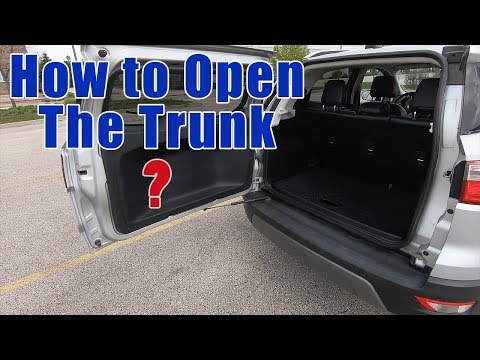
Ford Ecosport
(2012-2023 /
BK, MK 1)
Before you start, exit the cabin of your Ford Ecosport and head to the rear boot lid. Begin by grasping and pulling the handle located inside the rig…
Ford Ecosport
(2012-2023 /
BK, MK 1)
The rear door of the Ford Ecosport opens sideways, meaning it opens in the same direction as the side doors of the car. The handle for opening is loc…

Ford Ecosport
(2012-2023 /
BK, MK 1)
In this short and simple video, see how to manually open the rear boot lid of the first-generation Ford Ecosport in its facelift version (also applic…
Other guides you may be interested in
|
How to Open the Fuel Filler Flap in the Hyundai i30?
In this tutorial, you will learn how to open the fuel filler flap in the Hyundai i30, a very simple operation that follows the typical procedure of most vehicles. First, unlock the locks using the designated button on the remote, then open the driver's door, locate the release lever on the left side of the seat, and operate it. Next, move to the fuel filler flap, open it completely, unscrew the cap, and refuel as needed. To close the flap, simply press it gently. by ScegliAuto More videos
|
|
For advertising on this site Write to info@scegliauto.com
ScegliAuto is not responsible for any inaccuracy of the data in the lists. To report any inaccuracy or your business (if you own the business in question), please write to info@scegliauto.com
Number of seconds to generate the page: 0.078
(c) ScegliAuto 2026 - info@scegliauto.com - Privacy policy VAT number: IT01247470535 |
