
|
Do it yourself
| |||
| ||||


How to reset the TPMS light on the Mini Cooper
Model: Mini Mini
F55, F54, F57, F56
- Years 2014-2023
If the TPMS warning light appears on the display of your Mini Cooper even in the absence of punctures, all you have to do is perform a manual reset of the warning light in question. Below you will find the description of the various steps you need to follow to complete the operation. First, start the infotainment system and then access the settings screen and click on "Vehicle status". At this point, click on "Tire settings" and then proceed with resetting the warning light. Once the reset is complete, exit the settings and you have completed the procedure.
Posted on 26 October 2025 by ScegliAuto
Video tutorial
Related tutorials
Mini
(2001-2007 /
R52, R50, R53)
To reset the tire pressure warning light on a Mini Cooper, turn on the instrument panel without starting the engine. Using the turn signal lever, acc…

Mini
(2007-2014 /
R57, R55, R56)
When the TPMS light comes on in the Mini Cooper, it means that the tire pressure needs to be adjusted. Once this operation is done, you can proceed w…

Mini
(2014-2023 /
F55, F54, F57, F56)
In this tutorial, we can see how to reset the service in the Mini Cooper, an extremely simple and quick operation, to be carried out only once the co…
Other guides you may be interested in |
How to Remove the Original Radio on a Honda CR-V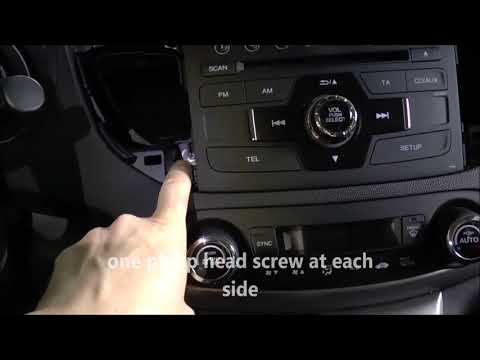
How do you remove the original radio on a Honda CR-V? First, use a plastic lever to remove the side cover of the radio (the air vents), then, with a screwdriver, unscrew the securing screws located on the sides (if present). After unscrewing the side screws (and disconnecting the clips) of the stereo, pull it out from its slot and remove it (disconnect the various power connectors at the back). To install the new stereo and the various removed parts, proceed in reverse order. by ScegliAuto More videos
|

|
For advertising on this site Write to info@scegliauto.com
ScegliAuto is not responsible for any inaccuracy of the data in the lists. To report any inaccuracy or your business (if you own the business in question), please write to info@scegliauto.com
Number of seconds to generate the page: 0.049
(c) ScegliAuto 2026 - info@scegliauto.com - Privacy policy VAT number: IT01247470535 |
