
|
Do it yourself
| |||
| ||||


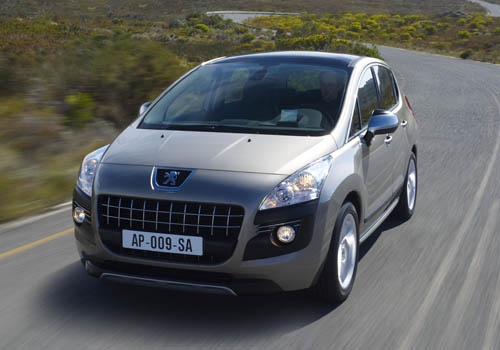
How to reset the screen of the Peugeot 3008?
Model: Peugeot 3008
MK 1, T84
- Years:
2009, 2010, 2011, 2012, 2013, 2014, 2015, 2016
Video tutorial
Many devices in the latest generation cars, such as for a software update error, a system bug, loss of GPS signal or internet data connection, may suddenly freeze or have structural issues, as shown in the video here, such as not opening or closing and so on. How to solve it? Many times the solution is simpler than you think, that is, disconnecting the fuse from the fuse box and reconnecting it after a few seconds. Another solution, technically similar, is to disconnect the power cables of the car battery and reconnect them, again after a few seconds.
Posted on 3 January 2025 by ScegliAuto
Related tutorials
Peugeot 3008
(2016-2023 /
P84, MK 2)
This video shows a practical and very simple DIY method to reset the dashboard screen on a Peugeot 3008, noting that the example is performed on a Pe…

Peugeot 3008
(2016-2023 /
P84, MK 2)
In this tutorial we can see how to adjust the brightness of the display in the Peugeot 3008, a very simple and quick operation. First of all, let's g…

Peugeot 3008
(2016-2023 /
P84, MK 2)
You can completely clear the Service light displayed on the instrument cluster of the Peugeot 3008 by pressing and holding the button on the right si…
Other guides you may be interested in
|
Frequently Asked QuestionsHow to Set the Time in an Audi A4?
In this tutorial, you will see how to set the time in an Audi A4, a very simple and quick operation to perform after replacing the battery or when the time changes. First, insert the key and turn on the instrument cluster. Then, press the "SETUP" button located on the center console. Next, press the upper left arrow button, navigate to the "Time" option, and use the central knob to adjust the clock. Finally, set any necessary formats and save by returning to the main screen. by ScegliAuto More videos
|
For advertising on this site Write to info@scegliauto.com
ScegliAuto is not responsible for any inaccuracy of the data in the lists. To report any inaccuracy or your business (if you own the business in question), please write to info@scegliauto.com
Number of seconds to generate the page: 0.161
(c) ScegliAuto 2026 - info@scegliauto.com - Privacy policy VAT number: IT01247470535 |
