
|
Do it yourself
| |||
| ||||


Model: Piaggio Mp3
In this tutorial we can see how to connect the smartphone to the Piaggio MP3 scooter using the Piaggio MIA app, an extremely simple and fast operation. First of all, we install the app on the smartphone and activate the bluetooth, then we turn on the instrument panel and, using the controls on the left handlebar, we reach the settings menu. We then enter "Configuration", "Pairing configuration", and select "Pairing request". Once the scooter is paired with the smartphone, simply enter the app and start transmitting data by selecting the blue icon in the lower right corner of the display.
Posted on 19 July 2025 by ScegliAuto
Video tutorial
Related tutorials
Mp3
What is the roll lock on the Piaggio MP3 scooter? It is a mechanical locking system for the front suspension, preventing the scooter from leaning sid…

Mp3
Today's procedure will show us how to disassemble and replace the front headlight of the Piaggio MP3 scooter, in simple steps. First, we put the scoo…

Mp3
In this tutorial we can see how to remove the rear fairings on the Piaggio MP3 scooter, an extremely simple and fast operation. First of all, go to t…
|
How to Replace the Battery in a Yamaha Vino 125 Scooter?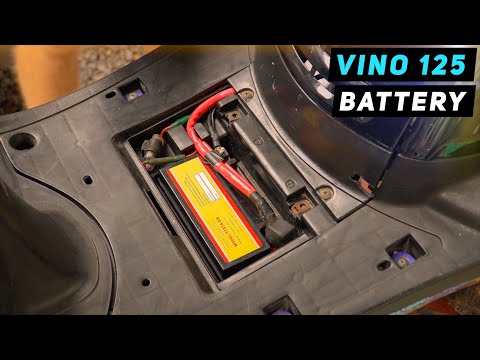
In this tutorial, you will see how to replace the battery in a Yamaha Vino 125 scooter, a very simple and quick operation. First, ensure that the key is not inserted for safety. Then, lift the rubber mat and, using a simple cross-head screwdriver, unscrew the two screws securing the plastic cover. Once opened, disconnect both terminals, starting with the negative, and remove the battery from its housing. To fit the replacement, simply follow the reverse procedure. by ScegliAuto More videos
|
|
For advertising on this site Write to info@scegliauto.com
ScegliAuto is not responsible for any inaccuracy of the data in the lists. To report any inaccuracy or your business (if you own the business in question), please write to info@scegliauto.com
Number of seconds to generate the page: 0.032
(c) ScegliAuto 2026 - info@scegliauto.com - Privacy policy VAT number: IT01247470535 |
