
|
Do it yourself
| |||
| ||||


Resetting Service Indicator for Next Service (On-Board Computer Registration)
Model: Renault Megane
Megane 2
- Years 2002-2010
Video tutorial
Detailed instructions - To reset the SERVICE message, no diagnostic tools are required: this is a manual operation performed simply with the button located beside the wiper stalk. Turn on the ignition and press the side button to scroll through the menu until you reach the SERVICE message; at this point, hold the button for about 10 seconds during which the service message will start to flash until a new mileage interval for the next maintenance appears; then release the button to complete the operation.
Updated on 6 February 2026 by ScegliAuto
Related tutorials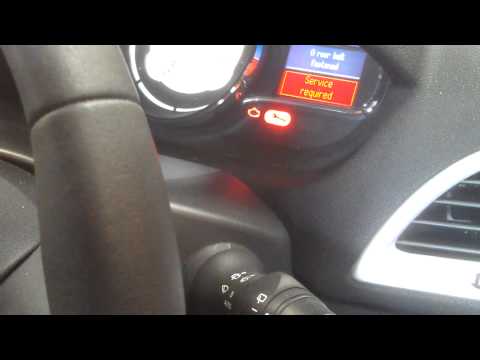
Renault Megane
(2008-2015 /
Megane III, Megane 3)
To reset the mileage indicator on the onboard computer for the next maintenance service, perform the following steps. Turn the ignition key to the st…

Renault Megane
(2022-2026 /
E-Tech)
To reset the "Service" light on a Renault Megane, start by turning on the instrument panel without starting the engine. Use the buttons on the steeri…

Renault Megane
(2008-2015 /
Megane III, Megane 3)
Today's guide will show you how to change the language on the on-board computer of a Renault Megane in simple and quick steps. First, get in the vehi…
Other guides you may be interested in
|
Frequently Asked QuestionsHow to Replace the Front Indicator Bulb on a Citroen C4 Picasso
Follow the procedure to remove and replace the front indicator bulb of the Citroen C4 Picasso and Grand Picasso. First, open the bonnet of the vehicle and disconnect the connector along with the bulb holder of the indicator light. Then, remove the small bulb of the indicator and replace it with a new one, as shown in the video. At this point, refit the bulb and the bulb holder onto the front optical unit, replacing the other indicator in the same manner. by ScegliAuto More videos
|
|
For advertising on this site Write to info@scegliauto.com
ScegliAuto is not responsible for any inaccuracy of the data in the lists. To report any inaccuracy or your business (if you own the business in question), please write to info@scegliauto.com
Number of seconds to generate the page: 0.327
(c) ScegliAuto 2026 - info@scegliauto.com - Privacy policy VAT number: IT01247470535 |
