
|
Do it yourself
| |||
| ||||


How to Replace the Key Battery on a Renault Clio
Model: Renault Clio
MK 3, Clio 3, Clio III
- Years 2005-2013
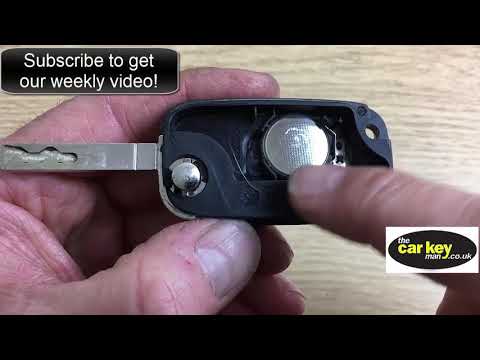
Here’s how to quickly replace the battery in your Renault Clio key. No special tools are needed, making this operation accessible to anyone. First, press the small button located at the bottom of the cover and pull out the physical emergency key completely. Next, remove the circular cover, and you will finally have access to the exhausted button cell battery underneath. Simply replace it with a new compatible one and reinsert the physical key back into the cover.
Updated on 7 May 2026 by ScegliAuto
Video tutorial
Related tutorials
Renault Clio
(2005-2013 /
MK 3, Clio 3, Clio III)
Before you can start replacing the key battery on your Renault Clio, you will need a small flathead screwdriver. Begin by prying off and removing the…
Renault Clio
(2005-2013 /
MK 3, Clio 3, Clio III)
Before starting, open the physical key of your Renault Clio by pressing the unlock button. Using a thin but sturdy tool, lever off and remove the bac…

Renault Clio
(2012-2019 /
Clio IV, MK 4, Clio 4)
In the following guide, we will help you complete the replacement of the battery in your Renault Clio Mk4 safely and quickly. First of all, make sure…
Other guides you may be interested in
|
How to Bleed the Clutch on a Renault Clio?
To bleed the clutch on a Renault Clio, open the bonnet to access the components located in the engine bay: here, you will need to undo the screws that secure the battery in its housing, the intake manifold, and the coolant reservoir. This will allow you to locate the pipe through which the brake fluid flows: by inserting the other end of the pipe into a container, you can press the clutch pedal to expel all the fluid until it fills the container. by ScegliAuto More videos
|

|
For advertising on this site Write to info@scegliauto.com
ScegliAuto is not responsible for any inaccuracy of the data in the lists. To report any inaccuracy or your business (if you own the business in question), please write to info@scegliauto.com
Number of seconds to generate the page: 0.269
(c) ScegliAuto 2026 - info@scegliauto.com - Privacy policy VAT number: IT01247470535 |
