
|
Do it yourself
| |||
| ||||


What to Do if Your Renault Clio Says "Card Not Detected"
Model: Renault Clio
Clio 3, MK 3, Clio III
- Years:
2005, 2006, 2007, 2008, 2009, 2010, 2011, 2012, 2013
Video tutorial
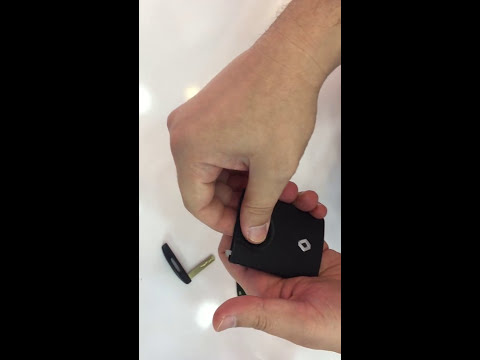
Let's see what to do if your Renault Clio says "card not detected": the electronic key is not recognised and you cannot start the engine, even when pressing the brake. It is not just a battery issue with the key, or not only that. The transponder may have shifted slightly or have an intermittent contact. Take a thin, flat tool and gently insert it into the slot of the key, as if to create an additional thickness. In the video, after this operation, the car immediately recognises the key and starts. This restores the contact of the transponder with the plate or battery, which over time, or due to a bump, may have lost its correct positioning.
Posted on 19 September 2026 by ScegliAuto
Related tutorials
Renault Clio
(2012-2019 /
Clio IV, Clio 4, MK 4)
If the remote for your Renault Clio is no longer recognised, it is likely that the battery is completely flat and needs replacing. This is a very sim…

Renault Clio
(2012-2019 /
Clio IV, Clio 4, MK 4)
Insert the card into the designated slot to start your vehicle. Once the dashboard lights up, use the buttons on the right lever to navigate through …
Renault Clio
(2012-2019 /
Clio IV, Clio 4, MK 4)
Today, in this video tutorial, see how to dismantle and replace the battery of the remote key or electronic card of the Renault Clio fourth series. F…
Other guides you may be interested in
|
How to Activate the Disabled TRC on the Toyota Yaris?
As the video clearly shows, disabling or activating the traction control (TRC or ESP) on the Toyota Yaris is very simple. By default, the traction system activates every time the vehicle is started. To disable it, simply press the button depicting a skidding car located in the centre of the vehicle where the controls are, such as the hazard lights and the radio, but near the handbrake. Once disabled, the TRC off light will illuminate on the dashboard. To reactivate it, just press the same button again. by ScegliAuto More videos
|
|
For advertising on this site Write to info@scegliauto.com
ScegliAuto is not responsible for any inaccuracy of the data in the lists. To report any inaccuracy or your business (if you own the business in question), please write to info@scegliauto.com
Number of seconds to generate the page: 0.118
(c) ScegliAuto 2026 - info@scegliauto.com - Privacy policy VAT number: IT01247470535 |
