
|
Do it yourself
| |||
| ||||


How to Replace the Clutch on a Sherco ST 290?
Model: Sherco St 290
Video tutorial
To replace the clutch on a Sherco ST 290, you need to loosen the screws securing the cover located on the right side of the bike, just below the exhaust pipe. Once the cover is opened, you will have access to the components inside, which must be disassembled by loosening their screws. Once removed, this will allow you to extract all the clutch discs, so they can be replaced with new spare parts. They must be secured with the respective bolts, protecting everything with the corresponding cover.
Updated on 19 May 2026 by ScegliAuto
Related tutorials
St 290
To replace the clutch of the Sherco ST 290, you need to loosen the screws that secure the cover of the clutch housing: this will be located in the ce…
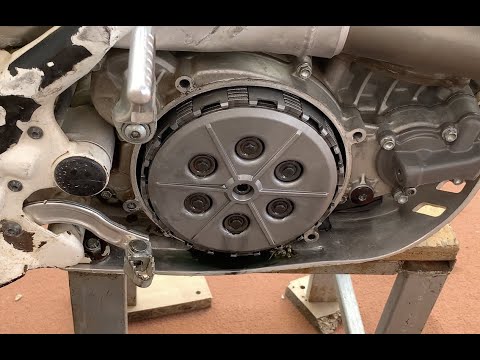
St 290
In this video tutorial, you will see how to dismantle and replace the clutch discs on a Sherco ST 290 motorcycle in simple steps. First, position you…

St 290
To remove the clutch of the Sherco ST 290, loosen the screws securing the cover located on the right side of the bike. Once the screws of the cover a…
|
How to Set the Time on the Fz6
In this article, you will learn how to adjust the time on the Yamaha Fz6 with the help of a video. The procedure takes little time and requires no tools. To set the time, first start the instrument cluster. If the time is displayed, press both buttons on the side of the cluster simultaneously. When the time starts to flash, use the lower button to adjust the hour. Once the hour is set, confirm by using the upper button, then adjust the minutes and confirm again. At this point, the procedure will be complete. by ScegliAuto More videos
|
|
For advertising on this site Write to info@scegliauto.com
ScegliAuto is not responsible for any inaccuracy of the data in the lists. To report any inaccuracy or your business (if you own the business in question), please write to info@scegliauto.com
Number of seconds to generate the page: 0.007
(c) ScegliAuto 2026 - info@scegliauto.com - Privacy policy VAT number: IT01247470535 |
