
|
Do it yourself
| |||
| ||||


Sym Voyager Gts 300 - Video guides Sym Voyager Gts 300 How to Replace the Drive Belt on the Sym Voyager GTS 300 Briefly follow these instructions to remove and replace the drive belt on the Sym Voyager GTS 300 scooter. First, place your scooter on the centre stand and …Read all… Posted on 14 September 2026 by ScegliAuto  Sym Voyager Gts 300 How to Replace the Front Tyre on the Sym Voyager GTS 300 Today, in this video tutorial, learn how to remove the front wheel and replace the tyre on the Sym Voyager GTS 300 scooter. First, place your scooter on the …Read all… Posted on 7 July 2026 by ScegliAuto |
How to find and enter the unlock code for the radio in the Dacia Dokker?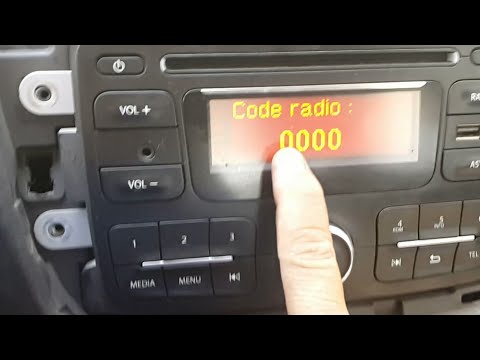
In this tutorial, you will learn how to find and enter the unlock code for the radio in the Dacia Dokker, a very simple operation necessary after replacing the battery. The code is usually found with the various documents provided at purchase, but if lost, it can be retrieved through various online services. These services require the serial number of the radio, which is located on the label on the top side of the unit. Once you have the unlock code, you can turn on the radio and enter it by repeatedly pressing the "1", "2", "3", and "4" buttons, and save the setting with the "6" button. by ScegliAuto More videos
|
|
For advertising on this site Write to info@scegliauto.com
ScegliAuto is not responsible for any inaccuracy of the data in the lists. To report any inaccuracy or your business (if you own the business in question), please write to info@scegliauto.com
Number of seconds to generate the page: 0.012
(c) ScegliAuto 2026 - info@scegliauto.com - Privacy policy - About us VAT number: IT01247470535 |
