
|
Do it yourself
| |||
| ||||


How to Set the Clock on a Volkswagen Lupo
Model: Volkswagen Lupo
MK 1
- Years:
1998, 1999, 2000, 2001, 2002, 2003, 2004, 2005
Video tutorial
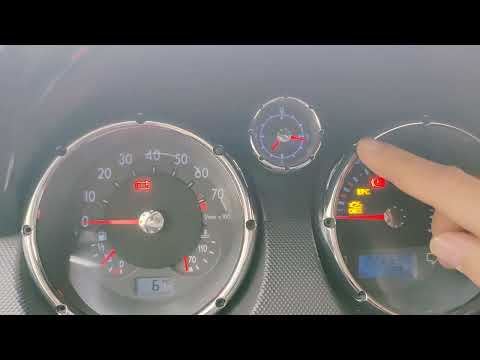
If you need to change the time displayed on the instrument panel of this car, follow the instructions in this description and refer to the images in the video. First, access the cabin, sit in the driver's seat, and turn on the ignition. Then, locate the button at the bottom left of the dashboard and press and hold it until the time display starts to flash. Next, press the button again to scroll through the hours. To save the new time, press the button once more, and you can repeat the same procedure to adjust the minutes.
Updated on 25 May 2026 by ScegliAuto
Related tutorials
Volkswagen Lupo
(1998-2005 /
MK 1)
In this video, you will learn how to adjust the mechanical analogue clock present in the Volkswagen Lupo. On the plastic frame surrounding the clock …
Volkswagen Lupo
(1998-2005 /
MK 1)
To set the clock on a Volkswagen Lupo, turn on the instrument cluster to enable the buttons on it. Once the cluster is powered, press and hold the bu…

Volkswagen Lupo
(1998-2005 /
MK 1)
To adjust the clock on the Volkswagen Lupo, turn on the ignition so you can use the buttons on the dashboard. After the dashboard is illuminated, pre…
Other guides you may be interested in
|
How to enter the radio code in the Opel Zafira?
In the Opel Zafira, it may happen that the radio locks and consequently requests the appropriate security code, especially after disconnecting or replacing the battery. The code can be found in the documents provided at purchase or through one of the various online recovery services. Once obtained, enter it by following the procedure shown in this tutorial. First, switch on the instrument panel, then press and hold both the "AS" button and the left knob for about 5 seconds. Next, enter the first digit by repeatedly pressing the "1" button, continue with the next 3 buttons, and save the setting by pressing the "AS" button again. by ScegliAuto More videos
|
|
For advertising on this site Write to info@scegliauto.com
ScegliAuto is not responsible for any inaccuracy of the data in the lists. To report any inaccuracy or your business (if you own the business in question), please write to info@scegliauto.com
Number of seconds to generate the page: 0.141
(c) ScegliAuto 2026 - info@scegliauto.com - Privacy policy VAT number: IT01247470535 |
