
|
Do it yourself
| |||
| ||||


|
Model: Yamaha Tricity 300
Today we will learn how to adjust the time on the display of the instrument panel on the Yamaha Tricity 300 scooter. First, put the scooter on the center stand and turn on the instrument panel; then press and hold the right button (located below the emergency stop button) to enter the clock setting, until the hour starts flashing, as shown in the video. At this point, set the correct hour and then the minutes, finally exit the menu to save the changes made!
Posted on 14 November 2025 by ScegliAuto
Video tutorial
Related tutorials
Tricity 300
The following steps will allow us to set the clock of the Yamaha Tricity 300 scooter. First, we put the scooter on the stand and start turning on the…

Tricity 300
The following steps will show you how to adjust the clock on the display of the instrument panel of the Yamaha Tricity 300 scooter. First, place the …

Tricity 300
In order to set the clock of the Yamaha Tricity 300, you need to turn on the instrument panel by inserting the ignition key into the corresponding sl…
|
How to Remove the Final Drive from a BMW R 1200 GS?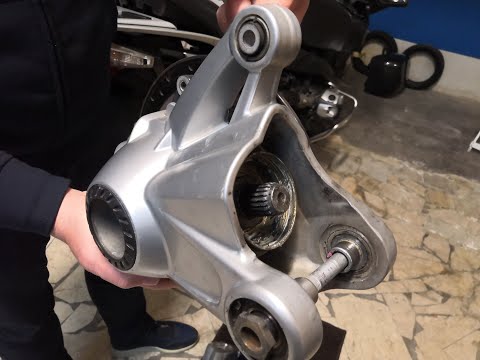
To remove the final drive from a BMW R 1200 GS, loosen the bolts securing the exhaust so it can be removed along with the rear wheel. The rear wheel will also be removed by unscrewing the five bolts that secure it to the swingarm. Next, detach the brake caliper by unscrewing the mounting bolts and remove the rear part of the swingarm. Inside, you will find the final drive, which should be extracted and replaced with a new spare part; after replacement, reassemble all previously removed components. by ScegliAuto More videos
|
|
For advertising on this site Write to info@scegliauto.com
ScegliAuto is not responsible for any inaccuracy of the data in the lists. To report any inaccuracy or your business (if you own the business in question), please write to info@scegliauto.com
Number of seconds to generate the page: 0.007
(c) ScegliAuto 2026 - info@scegliauto.com - Privacy policy VAT number: IT01247470535 |
