
|
Do it yourself
| |||
| ||||


BMW X1 - Tail light bulbTail Light Bulb BMW X1 (2015-2022 / f 48) BMW X1 (2015-2022 / F48) How to Replace the Rear Headlight Bulbs on the BMW X1 Below are the instructions to remove and replace the rear headlight bulbs on the BMW X1. First, open the trunk hatch and start unscrewing the screws located on …Read all… Posted on 21 May 2026 by ScegliAuto  BMW X1 (2015-2022 / F48) How to Replace the Tail Light Bulbs on a BMW X1? Replacing the tail light bulbs on a BMW X1, as shown in this tutorial, is an extremely simple and quick task. Before proceeding, ensure that the key is not in …Read all… Posted on 9 October 2026 by ScegliAuto  BMW X1 (2015-2022 / F48) How to Replace the Tail Light Bulbs on a BMW X1? In this tutorial, you will see how to replace the tail light bulbs on a BMW X1, a very simple and quick operation. First, ensure the key is not in the …Read all… Posted on 30 September 2026 by ScegliAuto  BMW X1 (2015-2022 / F48) How to Replace the Rear Headlight Bulb on a BMW X1 Today, you will learn the steps to remove and replace the rear headlight bulbs on a BMW X1. First, open the trunk and start removing the plastic cover of the …Read all… Posted on 18 August 2026 by ScegliAuto Cigarette lighter (1) Airbag (1) Antenna (1) Car stereo (1) Roof rack bars (1) Battery (36) Transmission (1) Body (1) Key (28) Timing belt (4) Onboard computer (2) Checks and maintenance (20) Dashboard (2) Brake rotors (1) Rear bench seat (1) Headlight (1) Tail light (2) Diesel particulate filter (2) Air filter (2) Cabin air filter (10) Light bulb (4) Headlight bulb (8) Tail light bulb (4) Antifreeze coolant (1) Handle (2) Brake fluid (1) Clock (9) Door trim panel (7) Front bumper (7) Shift knob (1) Push button (2) Instrument cluster (2) Fuse box (20) Seat (6) Brake system (1) Oxygen sensor (1) Side mirror (2) AdBlue warning light (1) Warning light – error code (24) (1) Tire pressure warning light (33) Service warning light (72) Fuel cap (2) |
How to Reset the Tyre Pressure Light on a Cupra Formentor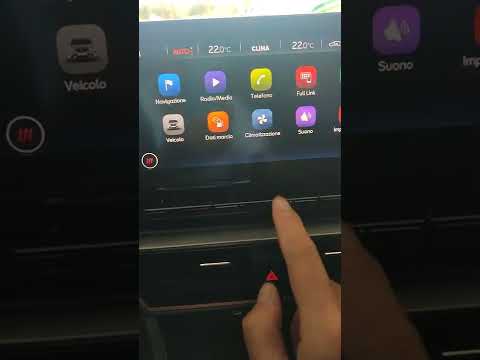
In this brief and simple video tutorial, learn how to reset the tyre pressure on a Cupra Formentor. Start by pressing the ignition button to turn on the instrument cluster. Now, use the touchscreen display on the central console to open the car menu. From here, select the driving data option, then the tyre pressure option. Now, click on the "SET" button with the pressure warning symbol and confirm the correct tyre pressure required by the manufacturer to perform the reset. by ScegliAuto More videos
|
|
For advertising on this site Write to info@scegliauto.com
ScegliAuto is not responsible for any inaccuracy of the data in the lists. To report any inaccuracy or your business (if you own the business in question), please write to info@scegliauto.com
Number of seconds to generate the page: 0.007
(c) ScegliAuto 2026 - info@scegliauto.com - Privacy policy VAT number: IT01247470535 |
