
|
Do it yourself
| |||
| ||||


How to Replace the Timing Belt on a Chevrolet Matiz
Model: Chevrolet Matiz
MK 1
- Years:
1998, 1999, 2000, 2001, 2002, 2003, 2004, 2005, 2006, 2007, 2008, 2009
This video is currently unavailable
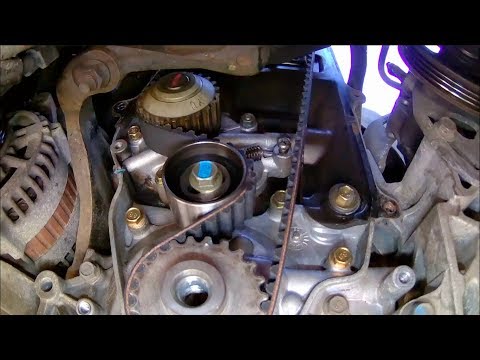
How to replace the timing belt on a Chevrolet Matiz. Open the bonnet and secure it, lift the car on a column lift (if necessary, remove the front wheel using a screwdriver to take off the right wheel arch liner). Use a fixed spanner to loosen the tensioner pulley and slide the belt off its seat. Use a socket spanner to undo the securing bolt of the tensioner pulley, then remove the water pump as shown in the video. Fit the new water pump, the tensioner, and the belt itself, tightening everything with the socket spanner. Finally, refit the rivets along with the wheel arch liner and reattach the wheel with the tyre to the vehicle.
Updated on 2 March 2026 by ScegliAuto
Related tutorials
Chevrolet Matiz
(1998-2010 /
MK 1)
In this brief and simple guide, we will cover the main steps to replace the timing belt of the Chevrolet Matiz 800 cc. First, lift the vehicle and re…

Chevrolet Matiz
(1998-2010 /
MK 1)
Replace the timing belt on a Chevrolet Matiz. Lift the bonnet, remove the soundproofing panel from the engine and the timing belt cover (if necessary…
Chevrolet Matiz
(1998-2010 /
MK 1)
This video will teach you how to replace the old timing belt on your Daewoo Matiz with a new one. To facilitate the removal and replacement of the be…
Other guides you may be interested in
|
How to enter the radio code in the Opel Zafira?
In the Opel Zafira, it may happen that the radio locks and consequently requests the appropriate security code, especially after disconnecting or replacing the battery. The code can be found in the documents provided at purchase or through one of the various online recovery services. Once obtained, enter it by following the procedure shown in this tutorial. First, switch on the instrument panel, then press and hold both the "AS" button and the left knob for about 5 seconds. Next, enter the first digit by repeatedly pressing the "1" button, continue with the next 3 buttons, and save the setting by pressing the "AS" button again. by ScegliAuto More videos
|
|
For advertising on this site Write to info@scegliauto.com
ScegliAuto is not responsible for any inaccuracy of the data in the lists. To report any inaccuracy or your business (if you own the business in question), please write to info@scegliauto.com
Number of seconds to generate the page: 0.058
(c) ScegliAuto 2026 - info@scegliauto.com - Privacy policy VAT number: IT01247470535 |
