
|
Do it yourself
| |||
| ||||


How to replace the GMC Terrain key battery
Model: GMC Terrain
MK 2
- Years 2018-2025
If you own a GMC Terrain and want to know how to replace the car key battery then this guide is all you need. First, locate the small metal button at the bottom of the cover and press it so as to release the physical emergency key contained in the cover itself. Then remove the back cover with your own hands (or with the help of a flat screwdriver) and locate the coin cell battery immediately below. All that remains is to remove it and replace it with the new battery. Finally, replace the back cover.
Posted on 27 July 2022 by ScegliAuto
Video tutorial
Related tutorials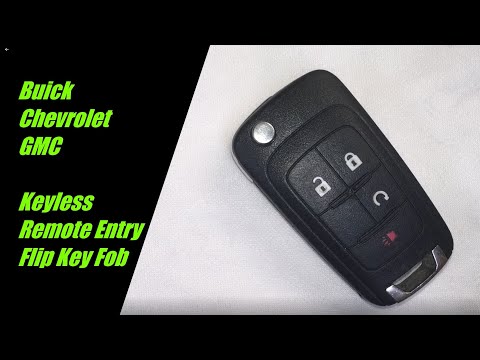
GMC Terrain
(2018-2025 /
MK 2)
Replacing the battery of the GMC Terrain remote control, as we can see in this tutorial, is an extremely simple and fast operation. To do this, we wi…

GMC Terrain
(2018-2025 /
MK 2)
Thanks to the following guide, you will finally be able to replace the small button battery inside the smart remote of your second generation GMC Ter…

GMC Terrain
(2018-2025 /
MK 2)
In order to program the key of the GMC Terrain, you need to insert the blank key into the ignition switch; at this point, you can connect a scanner t…
Other guides you may be interested in
|
How to Remove the Grille on a Ford Ranger
In this video, learn how to remove the grille located on the front bumper of a Ford Ranger. Prepare to take off the plastic grille: use a socket spanner to unscrew the fasteners securing the grille (located on the inside of the bumper). With a plastic lever, pry between the grille and the bumper until it disengages from its housing. Once the grille is free, remove it from the bumper and fit a new one. Refit the grille onto the car's bumper by pressing it into place and screw the fasteners back in. Check that all parts are correctly mounted. by ScegliAuto More videos
|
|
For advertising on this site Write to info@scegliauto.com
ScegliAuto is not responsible for any inaccuracy of the data in the lists. To report any inaccuracy or your business (if you own the business in question), please write to info@scegliauto.com
Number of seconds to generate the page: 0.152
(c) ScegliAuto 2026 - info@scegliauto.com - Privacy policy VAT number: IT01247470535 |
