
|
Do it yourself
| |||
| ||||


Model: Honda Pcx 150
The display of a moped, like cars, provides countless information and among these, see the example of the Honda PCX, there is also the clock. The sudden disconnection of the power battery or the change of time from legal to solar and vice versa, requires a new setting, in fact in this regard it will be the video tutorial above to show us how to do it: After turning on the instrument panel, press the buttons on the right and left of the same panel and access the time settings. With the left button, adjust the hours first and then the minutes, while with the right button, validate the change.
Posted on 29 September 2025 by ScegliAuto
Video tutorial
Related tutorials
Pcx 150
In this tutorial we can see how to adjust the time on the Honda PCX scooter, an extremely simple and quick operation, to be carried out for example a…

Pcx 150
Today we will explain how to set the time on the Honda PCX 150 motorcycle. The steps to change the time on the instrument panel are: - turn on the mo…

Pcx 150
These short and simple steps will show us how to change the time on the instrument panel of the Honda PCX 150 scooter. First, put the scooter on the …
|
How do you reset the Oil Check light on the Sym VF 185?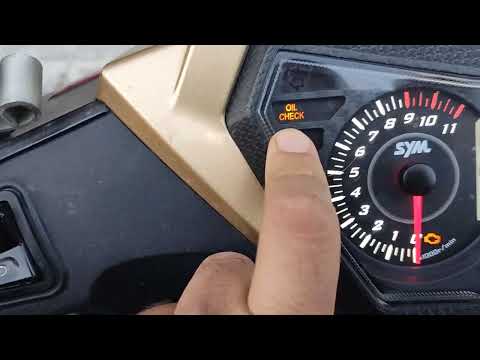
In order to reset the Oil Check light on the Sym VF 185, you need to turn on the instrument panel by turning the key in the ignition switch. Once the panel is on, you can press and hold the button located at the bottom right of the instrument panel for a few seconds. You will need to continue holding the button for a few seconds and then release it before pressing the next button. This will make the Oil Check light disappear from the instrument panel, and you can turn it off again by turning the key in the opposite direction. by ScegliAuto More videos
|
|
For advertising on this site Write to info@scegliauto.com
ScegliAuto is not responsible for any inaccuracy of the data in the lists. To report any inaccuracy or your business (if you own the business in question), please write to info@scegliauto.com
Number of seconds to generate the page: 0.006
(c) ScegliAuto 2026 - info@scegliauto.com - Privacy policy VAT number: IT01247470535 |
