
|
Do it yourself
| |||
| ||||


How to reset the service on the Honda Click 125 scooter?
Model: Honda Click 125
Video tutorial
In this tutorial, you will see how to reset the service on the Honda Click 125 scooter, a very simple and quick operation to perform only after completing all scheduled maintenance tasks. First, insert the key, then turn on the instrument panel and hold both dashboard buttons until the clock starts flashing. Next, access the service setting using the right button, adjust the interval with the left button, and save by pressing the right button once more. To complete the operation, simply restart the instrument panel.
Posted on 27 April 2026 by ScegliAuto
Related tutorials
Click 125
.. In this tutorial, see how to reset the service on the Honda Click 125 scooter, a very simple and quick operation to perform.. …

Click 125
In this tutorial, we will see how to reset the service indicator on the Honda Click 125 scooter, an operation that is extremely simple and quick, to …
Click 125
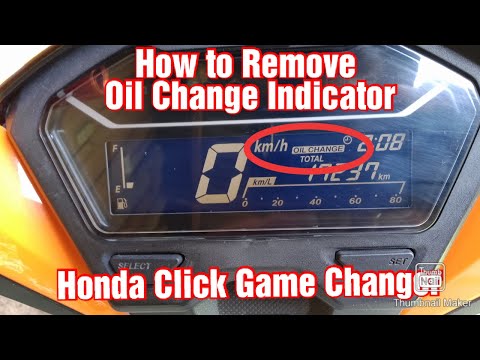
Resetting the oil service on the Honda Click 125 scooter, as shown in this tutorial, is an extremely simple and quick operation. Before doing this, e…
|
How to replace the drive belt on the Yamaha Xmax 300
Here are the instructions for removing and replacing the drive belt on the Yamaha Xmax 300 scooter. First, place the scooter on its centre stand and start unscrewing all the screws securing the transmission cover, which are located on the sides; then unscrew the central nut of the fan and subsequently that of the clutch bell, as shown in the video. Once the components are removed, take out and replace the drive belt with a new one; reassemble or replace the entire clutch pack if necessary. by ScegliAuto More videos
|
|
For advertising on this site Write to info@scegliauto.com
ScegliAuto is not responsible for any inaccuracy of the data in the lists. To report any inaccuracy or your business (if you own the business in question), please write to info@scegliauto.com
Number of seconds to generate the page: 0.006
(c) ScegliAuto 2026 - info@scegliauto.com - Privacy policy VAT number: IT01247470535 |
