
|
Do it yourself
| |||
| ||||


How to reset the service on the Honda Click 125 scooter?
Model: Honda Click 125
Video tutorial
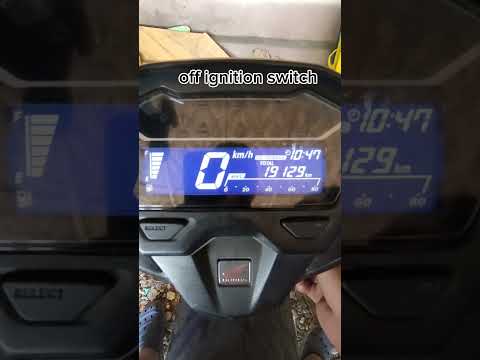
In this tutorial, we will see how to reset the service indicator on the Honda Click 125 scooter, an operation that is extremely simple and quick, to be done only after completing all scheduled maintenance tasks. First, we insert the key, then we turn on the instrument panel and hold down both buttons on the dashboard until the clock starts to blink. Next, we scroll through the various information using the right button, reach the service indication, and reset the interval using the left button. To save the setting, simply press the right button one last time.
Posted on 10 December 2025 by ScegliAuto
Related tutorials
Click 125
.. In this tutorial, see how to reset the service on the Honda Click 125 scooter, a very simple and quick operation to perform.. …
Click 125
This tutorial shows how to reset the oil service on a Honda Click 125 scooter, a very simple and quick operation. Before proceeding, ensure you have …

Click 125
Resetting the oil service on a Honda Click 125 scooter, as shown in this tutorial, is a very simple and quick operation. Before proceeding, ensure th…
|
How to Replace the Clutch on a BMW R 1200 GS?
To replace the clutch on a BMW R 1200 GS, loosen the bolts securing the engine block and transmission to their housing, located at the central lower part of the frame. Once all components are removed from their positions, disconnect the gearbox from the engine to access the clutch situated between the two parts. This needs to be freed from its housing to allow for the new one to be inserted; after replacement, remount the engine and gearbox, ensuring everything functions correctly. by ScegliAuto More videos
|
|
For advertising on this site Write to info@scegliauto.com
ScegliAuto is not responsible for any inaccuracy of the data in the lists. To report any inaccuracy or your business (if you own the business in question), please write to info@scegliauto.com
Number of seconds to generate the page: 0.007
(c) ScegliAuto 2026 - info@scegliauto.com - Privacy policy VAT number: IT01247470535 |
