
|
Do it yourself
| |||
| ||||


|
Model: Kawasaki Kx 250
To replace the clutch on the Kawasaki KX 450, loosen the screws securing the clutch cover located on the right side of the bike. Once the screws are loosened, you can completely detach the protective cover and locate the underlying clutch discs. All discs can be removed from their housing, allowing you to insert the new replacement parts. After replacement, secure the discs, cover everything with the clutch cover, and check that everything functions correctly.
Updated on 3 September 2026 by ScegliAuto
Video tutorial
Related tutorials
Kx 250
The clutch replacement operation on the Kawasaki KX 250 can be carried out by loosening the screws that secure the cover casing located in the lower …

Kx 250
In this video, you will see how to remove and replace the engine spark plug on a Kawasaki KX 250 F enduro bike, in simple and quick steps. First, rem…

Kx 250
In this tutorial, you will see how to change the engine oil in a Kawasaki KX250, a very simple and quick operation. First, ensure that the engine is …
|
How to Reset the Oil Light on a Honda PCX 160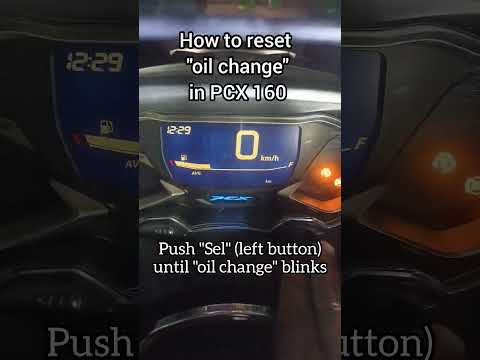
In this mini guide, discover the steps to manually reset the oil light on the central display of your Honda PCX 160. First, turn on the ignition with the key and press both the 'Sel' and 'Set' buttons located below it simultaneously. When the time starts to flash, hold 'Sel' until the oil indicator flashes, then press the 'Set' button once. To complete the reset, hold 'Sel' again until the operation is finished. by ScegliAuto More videos
|
|
For advertising on this site Write to info@scegliauto.com
ScegliAuto is not responsible for any inaccuracy of the data in the lists. To report any inaccuracy or your business (if you own the business in question), please write to info@scegliauto.com
Number of seconds to generate the page: 0.006
(c) ScegliAuto 2026 - info@scegliauto.com - Privacy policy VAT number: IT01247470535 |
