
|
Do it yourself
| |||
| ||||


How do you reset the Service light on the Mini Cooper?
Model: Mini Mini
R57, R55, R56
- Years 2007-2014
To make the Service light disappear from the Mini Cooper instrument panel, you will need to turn on the instrument panel and navigate through the menu by pressing the button located at the end of the lever on the left side of the steering wheel. When the car icon on a bridge is displayed, you will need to hold down the button on the end of the lever until a confirmation message appears. The same operation must be performed when the oil icon appears. Once the two reset operations have been completed, you can turn off and on the instrument panel to verify that the light has been reset.
Posted on 16 August 2025 by ScegliAuto
Video tutorial
Related tutorials
Mini
(2014-2023 /
F55, F54, F57, F56)
Like all cars, the Mini Cooper also has its maintenance program, detailed in the user manual. The oil change and oil filter replacement are essential…

Mini
(2023-2026 /
F66)
To reset the Service light on the Mini Cooper, you will need to turn on the instrument panel by inserting the ignition key into the corresponding slo…

Mini
(2014-2023 /
F55, F54, F57, F56)
In order to reset the Service light on the Mini Cooper D, you need to turn on the instrument panel by inserting the key into the corresponding igniti…
Other guides you may be interested in
|
How to Remove the Air Vents on an Alfa Romeo 159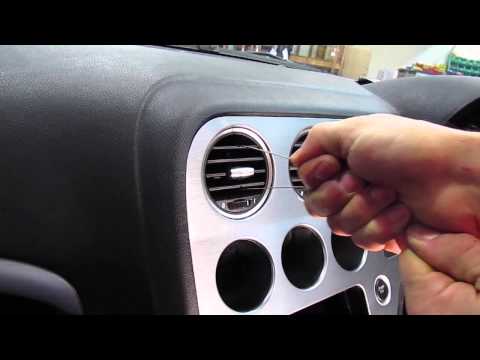
This video shows how to remove the air vents on an Alfa Romeo 159. Start by using a plastic trim tool to detach the air vents located in the central dashboard; if you have difficulty, obtain metal hooks (as shown in the video) and insert them into the air vent. Once the two hooks are secured to the edges of the air vent, pull them out with your hands until the vent is removed from its housing. Repeat this procedure for the other air vents present on the car's dashboard. Finally, install the new vents. by ScegliAuto More videos
|

For advertising on this site Write to info@scegliauto.com
ScegliAuto is not responsible for any inaccuracy of the data in the lists. To report any inaccuracy or your business (if you own the business in question), please write to info@scegliauto.com
Number of seconds to generate the page: 0.052
(c) ScegliAuto 2026 - info@scegliauto.com - Privacy policy VAT number: IT01247470535 |
