
|
Do it yourself
| |||
| ||||


How to set the time on the Mini Cooper R53?
Model: Mini Mini
R53, R50, R52
- Years 2001-2007
In case of incorrect time displayed on the small display of your Mini Cooper R53 (year 2001-2007), you can easily modify it manually by following these steps. First, insert the key and turn on the dashboard without starting the engine of your Mini Cooper R53. Immediately after, locate the button with the clock icon located inside the speedometer and hold it down for a couple of seconds. At this point, select the 12H or 24H format and proceed to modify the hour digits first and the minutes immediately after.
Posted on 14 December 2023 by ScegliAuto
Video tutorial
Related tutorials
Mini
(2014-2023 /
F55, F56, F57, F54)
If you want to manually set the correct time on your Mini Cooper (2017), just follow all the steps described in our new guide. First of all, get into…

Mini
(2001-2007 /
R53, R50, R52)
In this tutorial we can see how to adjust the time in the Mini Cooper, an extremely simple and fast operation, to be carried out for example after re…

Mini
(2007-2014 /
R55, R57, R56)
Today we will learn how to set the time on the instrument panel of the Mini Cooper. First, we get into the car and start up the instrument panel; the…
Other guides you may be interested in
|
How to Replace the Key Battery of the Ford Ecosport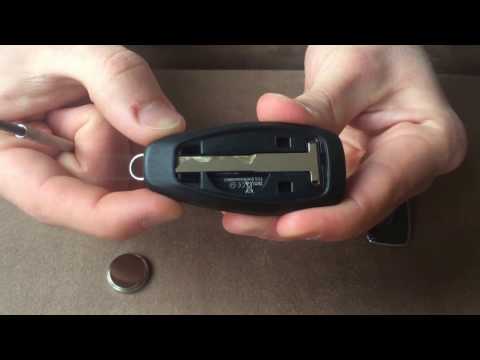
First, lift the rear cover of the remote, where the logo of your vehicle is located. You can do this by simply lifting it with your hands, giving you access to the metal key of the device. Remove it by lifting it out, and now use a flathead screwdriver to insert the blade into the slot at the top of the key. By applying a small lever, you can extract the panel covering the battery and separating the two parts of the key. Once you have access to the battery slot, you can easily replace it. by ScegliAuto More videos
|
|
For advertising on this site Write to info@scegliauto.com
ScegliAuto is not responsible for any inaccuracy of the data in the lists. To report any inaccuracy or your business (if you own the business in question), please write to info@scegliauto.com
Number of seconds to generate the page: 0.147
(c) ScegliAuto 2026 - info@scegliauto.com - Privacy policy VAT number: IT01247470535 |
