
|
Do it yourself
| |||
| ||||



How to Reset the Tyre Pressure Light in a Mini Cooper?
Model: Mini Mini
F56, F54, F57, F55
- Years:
2014, 2015, 2016, 2017, 2018, 2019, 2020, 2021, 2022, 2023
Video tutorial
In this tutorial, we will see how to reset the tyre pressure light in a Mini Cooper, a very simple and quick operation to perform only once the correct pressure for each tyre has been restored according to the instructions in the manual. First, go inside the cabin, then insert the key and turn on the instrument panel. Next, press the "Home" button located on the central console, enter "Vehicle Info", "Vehicle status", "INIT", and perform the reset by selecting the appropriate option. To complete the procedure, simply restart the instrument panel.
Posted on 2 February 2026 by ScegliAuto
Related tutorials
Mini
(2014-2023 /
F56, F54, F57, F55)
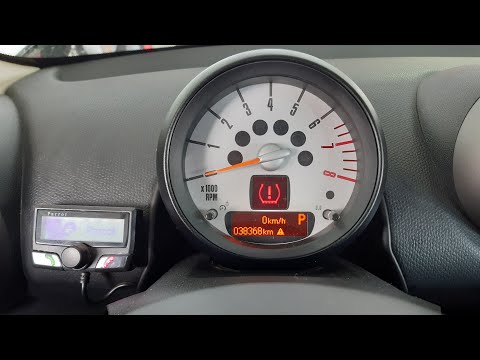
In this tutorial, you will learn how to reset the tyre light on a Mini Cooper, a very simple and quick operation, to be performed only after restorin…
Mini
(2010-2016 /
Countryman1, R60)
In this tutorial, you will see how to reset the tyre warning light on a Mini Cooper. This operation is very simple and quick, to be performed only af…

Mini
(2007-2014 /
R56, R57, R55)
In this tutorial, you will learn how to reset the tyre warning light in the Mini Cooper, an operation to be performed after restoring the correct pre…
Other guides you may be interested in
|
How to Open the Fuel Flap and Cap on an MG HS
This guide will show you how to open the fuel flap and cap on an MG HS in simple steps. To open the fuel flap, ensure the vehicle is unlocked; then press on the edge of the flap to open it, as shown in the video. Next, unscrew the fuel cap counterclockwise to refuel at the pump; once finished, screw the cap back on until it clicks, and finally close the fuel flap! by ScegliAuto More videos
|
|
For advertising on this site Write to info@scegliauto.com
ScegliAuto is not responsible for any inaccuracy of the data in the lists. To report any inaccuracy or your business (if you own the business in question), please write to info@scegliauto.com
Number of seconds to generate the page: 1.096
(c) ScegliAuto 2026 - info@scegliauto.com - Privacy policy VAT number: IT01247470535 |
