
|
Do it yourself
| |||
| ||||


How to reset the engine oil change on a Mini Cooper R56
Model: Mini Mini
R57, R55, R56
- Years 2007-2014
Today let's see how to reset the engine oil change light on a Mini Cooper R56. Let's start by turning on the car's instrument panel without starting the engine. Then, we press and hold the two buttons on the speedometer as shown in the video until the maintenance menu with various options to reset appears. Once we have done that, we press the "BC" button on the left lever of the steering wheel until we reach the residual life of the engine oil option. Now, we press and hold the "BC" button until the reset request appears, then we release it and press and hold it again to perform the reset and complete the job.
Posted on 6 February 2024 by ScegliAuto
Video tutorial
Related tutorials
Mini
(2007-2014 /
R57, R55, R56)
The engine air filter in your Mini Cooper R56 is a very important component and for this reason you must replace it periodically in order to preserve…

Mini
(2007-2014 /
R57, R55, R56)
If you don't know where the OBD port of your Mini Cooper R56 is located, don't worry because thanks to the steps described in the following guide, yo…

Mini
(2007-2014 /
R57, R55, R56)
To safely locate the OBD port inside your Mini Cooper R56, you just need to follow the steps described in the following guide addressed to you. First…
Other guides you may be interested in
|
Frequently Asked QuestionsHow to Remove the Driver's Side Airbag (Steering Wheel) on a BMW 3 Series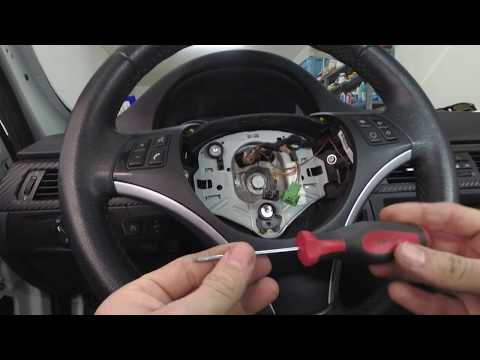
How to remove the driver's side airbag (steering wheel) on a BMW 3 Series? This operation is very simple if you follow the steps. Let's see in this guide how to proceed: insert a medium-length screwdriver into the rear slots on the steering wheel and turn until you release the clips that hold the airbag. Once the airbag is disconnected, disconnect the power connectors and remove it from the steering wheel. For reinstalling the airbag: connect the power connector, then press it onto the steering wheel until the locking clips snap into place inside the steering wheel. by ScegliAuto More videos
|

|
For advertising on this site Write to info@scegliauto.com
ScegliAuto is not responsible for any inaccuracy of the data in the lists. To report any inaccuracy or your business (if you own the business in question), please write to info@scegliauto.com
Number of seconds to generate the page: 0.080
(c) ScegliAuto 2026 - info@scegliauto.com - Privacy policy VAT number: IT01247470535 |
