
|
Do it yourself
| |||
| ||||


How to Reset the Radio on a Nissan
Model: Nissan Nissan Various
If you have replaced the battery on a vehicle from this Japanese manufacturer, when you turn on the radio, it will request the unlock code. Follow the instructions in this video tutorial and the description below to unlock it. Along with the documentation provided at the time of purchase, you will find a 4-digit code that you need to enter on the radio's display keypad to reactivate it. If you no longer have this code, you can take the vehicle to a dealership and request a copy by providing the chassis number.
Updated on 27 May 2026 by ScegliAuto
Video tutorial
Related tutorials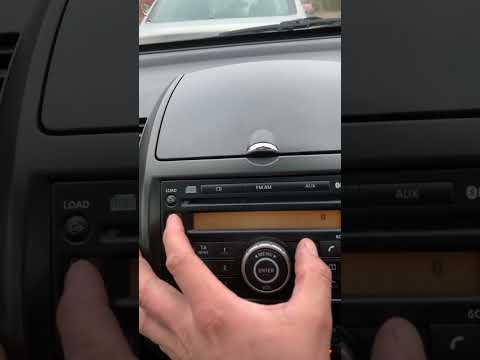
Nissan Nissan Various
Today, learn how to unlock a Nissan radio by entering the unlock code. First, switch on the ignition and the radio. Next, obtain the unlock code usin…

Nissan Nissan Various
In this tutorial, you will see how to enter the unlock code for the car radio in a Nissan, a very simple and quick operation, to be done, for example…

Nissan Nissan Various
How do you retrieve the radio code from an original Nissan radio? We may need to re-enter this code because we have done some work that forced us to …
Other guides you may be interested in
|
How to Set the Clock on the Opel Zafira
Setting the clock to the current Italian time on an Opel Zafira model B is a very simple operation, also made easier by our short instructional video. The first step is to turn on the instrument panel and then press the SETTING button located on the central dashboard. Once inside the menu, use the buttons to navigate to the clock setting. Adjust the hours and minutes and restart the instrument panel. If the clock does not update, it may be necessary to diagnose the radio or the vehicle's control unit. by ScegliAuto More videos
|
|
For advertising on this site Write to info@scegliauto.com
ScegliAuto is not responsible for any inaccuracy of the data in the lists. To report any inaccuracy or your business (if you own the business in question), please write to info@scegliauto.com
Number of seconds to generate the page: 0.142
(c) ScegliAuto 2026 - info@scegliauto.com - Privacy policy VAT number: IT01247470535 |
