
|
Do it yourself
| |||
| ||||


How to reset the service light on Renault Trafic 2, Opel Vivaro, and Nissan Primastar vehicles.
Model: Renault Trafic
MK 2
- Years 2001-2014
Performing a service light reset through a restoration program is a very simple and quick operation to carry out, as the steps are the same for various car models. We will explain in a single video how to use the program. It is important to connect your car to the PC via the OBD2 port. Then, it is necessary to select the car model in our case a Renault Trafic 2, select the type of action to perform, and wait for the connection confirmation. Finally, select the reset option and wait for the loading. We can then proceed in the same way on Nissan Primastar and Opel Vivaro vehicles.
Posted on 1 February 2025 by ScegliAuto
Video tutorial
Related tutorials
Renault Trafic
(2014-2026 /
MK 3)
In this video, we will see how to recalibrate the instrument panel on the Renault Trafic (also applicable to the Opel Vivaro and Nissan Primastar): s…

Renault Trafic
(2001-2014 /
MK 2)
In this video we can see how to disassemble the front panel of the Renault Trafic, the one that contains the manufacturer's logo. The same procedure …

Renault Trafic
(2001-2014 /
MK 2)
In this video we can see how to remove the spare wheel from the Renault Trafic (but also from Opel/Vauxhall Vivaro and Nissan Primastar). The wheel, …
Other guides you may be interested in
|
Frequently Asked QuestionsHow to Replace the Fan Resistor on a Renault Scenic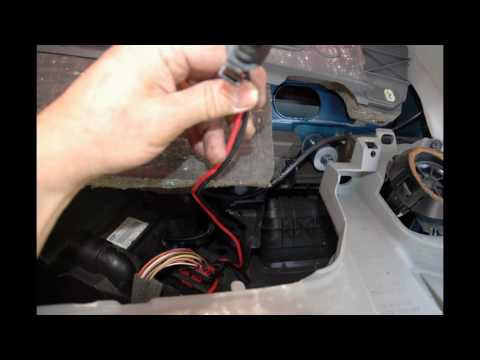
How to replace the fan resistor on a Renault Scenic. In this video, learn how to perform the disassembly: use a lever to remove the plastic under the glove compartment, and unscrew the cover (where the resistor is located) with a screwdriver. Disconnect the large connector of the resistor, then pull it out from the cabin. Insert a new fan resistor (connect the power connector). Finally, refit the cover and tighten the screws. Check the correct assembly of the previously fitted parts and test the correct operation of the fan. by ScegliAuto More videos
|
|
For advertising on this site Write to info@scegliauto.com
ScegliAuto is not responsible for any inaccuracy of the data in the lists. To report any inaccuracy or your business (if you own the business in question), please write to info@scegliauto.com
Number of seconds to generate the page: 0.048
(c) ScegliAuto 2026 - info@scegliauto.com - Privacy policy VAT number: IT01247470535 |
