
|
Do it yourself
| |||
| ||||


How to install a DIN 2 car radio in a Renault Clio II
Model: Renault Clio
MK 2, Clio 2
- Years:
1998, 1999, 2000, 2001, 2002, 2003, 2004, 2005
Video tutorial
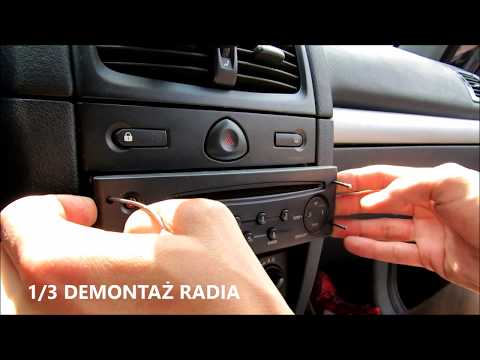
It is possible to install a DIN 2 radio (with a large screen) in a vehicle that does not have the provision for this type of radio, such as the Renault Clio II: the model used by our YouTuber is currently unavailable, but we found another with similar features, which allows for the installation of a rear camera (this is not illustrated in the video) with code B08XM511PP at a cost of £169.99 including delivery. So, remove the old stereo, take off its fascia, and install the new one. Then find a way to route the cables, quite craftily, and connect the electrical plugs. Finally, insert it into its housing. Fortunately, the screen is adjustable; otherwise, it would obstruct the gear lever. The functions are those of a common DIN 2, with Android Auto and Apple CarPlay, and many features, including the ability to upload the car logo.
Updated on 3 July 2026 by ScegliAuto
Related tutorials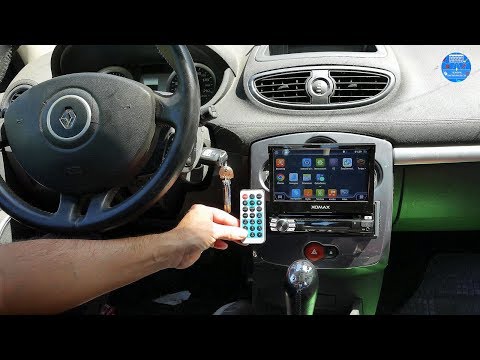
Renault Clio
(2005-2013 /
Clio 3, MK 3, Clio III)
Want to install a new car radio in the dashboard of a Renault Clio? Let's look at how to remove the old car radio. Insert the release keys into the h…

Renault Clio
(2005-2013 /
Clio 3, MK 3, Clio III)
In this guide, learn how to disassemble and replace the standard car radio with a 2-Din unit in the Renault Clio, following the instructions below. F…
Renault Clio
(2005-2013 /
Clio 3, MK 3, Clio III)
Need to remove the radio from a Renault Clio? Here's how to take it out from the centre console. Insert the release keys into the holes on the plasti…
Other guides you may be interested in |
How to Set the Time on an Audi A6
Briefly, we will see the instructions to set the time on the Audi A6 by following these simple steps. First, get inside the vehicle and turn on the instrument cluster; then press the settings button and navigate to the time option to confirm your choice, as shown in the video. At this point, set the correct time and format, then exit the settings menu to save the changes made; finally, start the engine and ensure that the time has been set correctly! by ScegliAuto More videos
|
|
For advertising on this site Write to info@scegliauto.com
ScegliAuto is not responsible for any inaccuracy of the data in the lists. To report any inaccuracy or your business (if you own the business in question), please write to info@scegliauto.com
Number of seconds to generate the page: 0.009
(c) ScegliAuto 2026 - info@scegliauto.com - Privacy policy VAT number: IT01247470535 |
